Lifecycle Maps

Your constantly-updated definition of Lifecycle Maps and collection of videos and articles.
Be a conversation starter: Share this page and inspire others!

98 Shares

What are Lifecycle Maps?

Lifecycle maps are high-level customer experience overviews that designers create to gain a holistic view of customers’ relationships with brands and to understand the purpose of each step to design for in the cycle. Charting the lifecycle from brand awareness onward, these serve as zoomed-out guides that can reveal vital insights.

“Whenever an organization makes the transition from one lifecycle stage to the next, difficulties arise.”

— Ichak Adizes, Business consultant and developer of the Corporate Life Cycle Model

See how lifecycle maps can help you guide how your brand reaches, impresses and retains customers: 

Transcript

Track Your Customers at Every Stage with Lifecycle Maps

The relationships people have with brands resemble the lifecycle as envisioned by Ichak Adizes, who developed the model for corporations to track their own development. Essentially, this lifecycle is a peak-shaped curve with the following points that correspond to the human lifecycle: Birth, Infant, Teen, Growth, Prime, Retirement and Death. In service design, these points represent where your users—who, hopefully, convert to remain as loyal customers—are during their user journeys with your service.

Lifecycle maps are different deliverables from customer journey maps. Journey maps offer more detailed views of (e.g.) customer pain points at the various touchpoints they encounter on their way to getting what they want from your service. Lifecycle maps complement journey maps, and can provide a vital vantage point when you’re trying to design for the many variables that will decide if your customers fall in love with your service.

More precisely, lifecycle maps can help you:

  • Get inside your target market’s minds while keeping an eye on the big picture during—what can be—long and complex journeys. Since service design is all about omnichannel and aiming to design the best experiences for customers as they switch between channels and touchpoints, you’ll need to plan for the pitfalls and opportunities that arise as people interact with your service digitally (e.g., placing orders on their phones) and physically (e.g., receiving these at a store).

  • Spot disconnects in the customer lifecycle. For example, your service might accommodate users who love coffee and let them easily collect points they can use to buy other goods, perhaps even including some gamification aspects. But what happens, for example, when a user dies? Can their loved ones deactivate the account? What happens to their points?

  • Understand the customer experience holistically – so you have a guide that shows your team and stakeholders how the various steps combine to make the customer experience overall and leave lasting impressions.
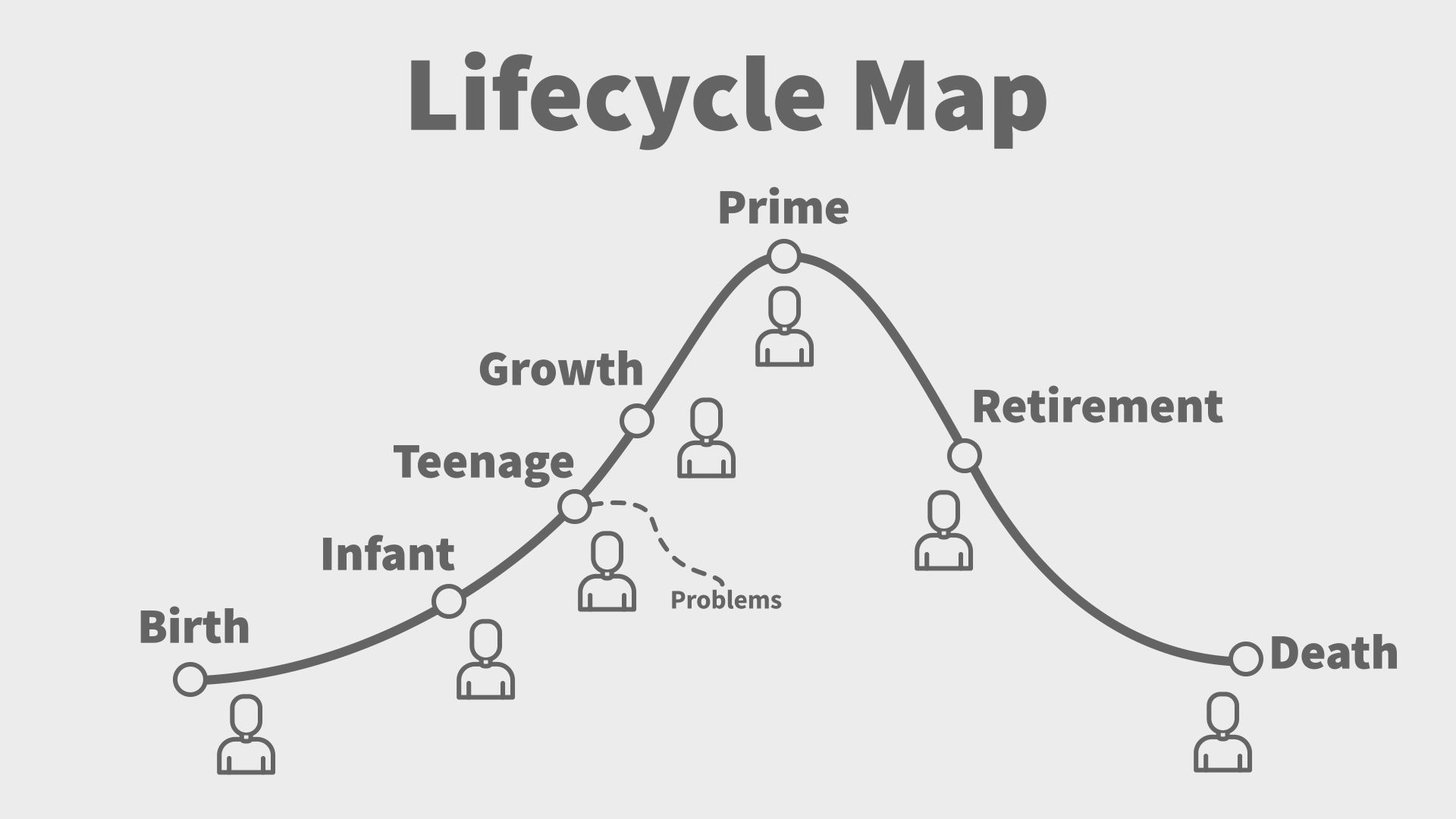
A diagram showing the lifecycle map cycle from birth to death.

© Frank Spillers and Experience Dynamics, adapted from Ichak Adizes, CC BY-NC-SA 3.0

How to Create Lifecycle Maps

Create these from your user research as zoomed-out views of where your customers are throughout the timeline from when they learn about, decide to become involved with and onward until they leave your brand. You’ll need to develop a solid understanding of your target service users (distilled as personas), what they stand to gain and lose (i.e., experience as pain points) and the value you can bring them.

Structure your map around the question “What is the customer doing (or trying to) at this stage of the lifecycle?” so you can envision the following:

  1. Birth – You advertise (e.g., on social media) to prospective customers, who have a problem to solve or a need to fulfill.

  2. Infant – You get them to start considering what your service offers. However, in their research they’ll also look at the solutions that other brands offer.

  3. Teen – You manage to convince them to engage with your brand by making a commitment (e.g., they sign up for your health-promoting app).

  4. Growth – You get them to start using your service as customers (e.g., they collect points by logging workout hours at participating gyms to use towards healthy meals at participating restaurants).

  5. Prime – You make them (at least) satisfied or (hopefully) fall in love with your service. As they become more familiar with it and appreciate the results (e.g., they’re in better shape), they’ll start to turn into loyal customers.

  6. Retirement – You retain these customers and continue to make them feel valued over time. They might start buying other services or items your brand offers since they trust it so much.

  7. Death – They leave your service, ideally because it’s solved their problem, got them what or where they want and left them with deep positive impressions. They’re likely to buy from you again if the need arises.

Tips

  • Keep an eye on the risks at every stage: early “death” (i.e., churn) can cost you many customers long before the Death stage. 

  • Retention is just as important as acquisition, so beware of what happens after the Prime stage as momentum might decay into disenchantment.

Overall, lifecycle maps should help you design how best to transition your customers from one lifecycle stage to the next. Remember to think beyond the series of tasks and objectives and aim higher, to accommodate customers at an emotional level throughout their relationship with your brand and the many turns and climbs on the way.
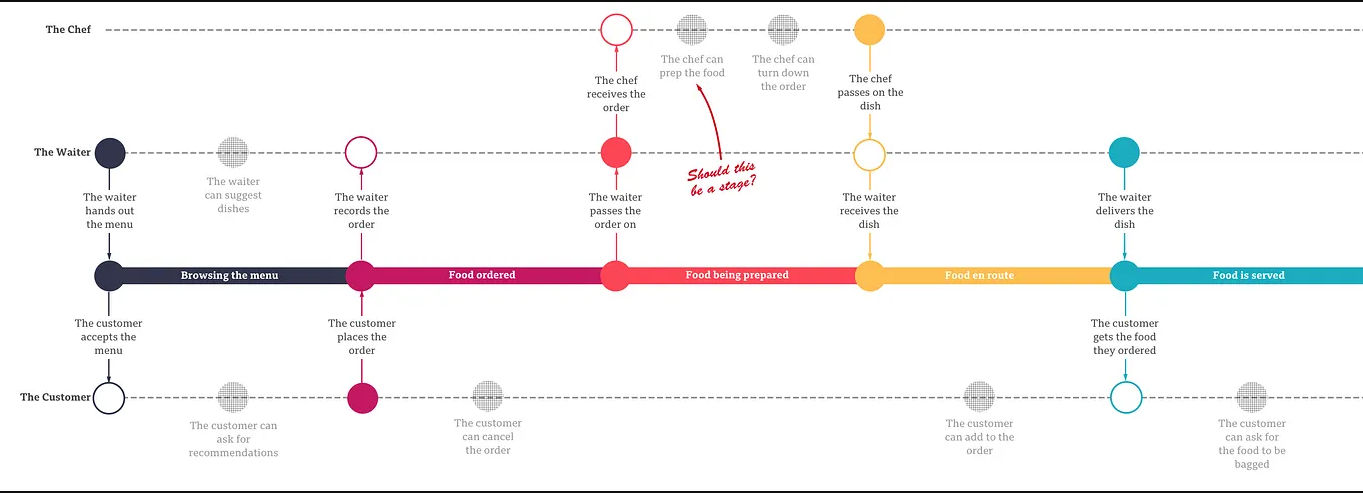
A lifecycle map including menu browsing, food ordering, food serving, and more.

© Karen Yunqiu LI, Fair use
Questions About Lifecycle Maps?
We've Got Answers!

Why should I use a lifecycle map in product or UX design?

You should use a lifecycle map to understand how users move through long-term relationships with your product—from initial awareness to loyalty and advocacy. This high-level tool reveals recurring patterns, disengagement risks, and emotional states throughout the full lifecycle—not just individual interactions. It guides design decisions toward improving retention, reengagement, and even reactivation strategies.

Lifecycle mapping aligns UX design with business strategy by showing how design influences customer evolution over time. Used well, lifecycle maps help balance emotional resonance with practical stages like awareness, purchase, and exit, helping create deeper, more sustainable user relationships.

Discover essential points in our article Creating Brand or Product Awareness and the User Experience.

How does a lifecycle map differ from a user journey map?

A lifecycle map captures the big-picture flow of user relationships across stages like awareness, consideration, loyalty, and exit. It helps organizations understand long-term dynamics and retention strategies.

On the other hand, a user journey map drills into specific touchpoints or tasks, highlighting user actions, emotions, pain points, and motivations in detail. Lifecycle maps offer a broader strategy view, while journey maps track detailed interactions. Mapping both ensures strategic clarity (lifecycle) and tactical empathy (journey). While lifecycle maps outline stage progression, journey maps capture the intimate steps users take within each stage—two vital canvases to have in strategy and design.

Enjoy our Master Class How to Create Actionable User Journey Maps with Kelly Jura, Vice-President, Brand & User Experience at ScreenPal for a deep dive into journey mapping.

What are the key stages in a typical user lifecycle map?

A typical user lifecycle map includes these high-level stages: Awareness (first encountering your brand), Consideration (exploring options), Selection or Purchase, Product Experience (using or learning), Loyalty, Advocacy, and Exit (churn or end of relationship).

Some models add engagement or “raving fan” phases to illustrate enthusiastic users. These stages often loop rather than flow linearly, since users can move back and forth. Mapping them helps you design at each touchpoint to nurture users instead of merely attracting them.

Explore additional helpful insights in our article Customer Lifecycle Mapping - Getting to Grips with Customers.

What elements should I include in a lifecycle map?

You want to include stage names (Awareness through Exit), typical user actions in each stage, and key emotional or engagement states. Add touchpoint categories or channels (ads, support, product experience). Highlight retention risks and “moment of truth” opportunities that drive loyalty or churn.

Layer in metrics like conversion or drop-off rates, plus notes on customer goals or expectations. Lifecycle maps work strategically, so clarity and emotional resonance matter more than granular detail for this UX strategy deliverable.

Speaking of strategy, explore important big-picture aspects and more in our article What Does a UX Strategist Do?.

How do I create a lifecycle map step-by-step?

To begin, gather data from research, analytics, and stakeholder insights to define lifecycle stages. Next, outline the purpose of each stage (such as Awareness or Loyalty). Then, note the mindset or emotional state of the user in each. Add high-level actions and interactions without diving into step-by-step tasks.

Highlight drop-off points or opportunities to delight. Present a visual map showing loops and progression over time. Last, but not least, validate with data or interviews, then use it to inform design decisions and strategic planning.

Get deep into user research to explore how it helps design teams fine-tune better designs.

What research should I do before creating a lifecycle map?

First, review customer data—conversion rates, churn metrics, engagement timelines. Next, conduct qualitative research, such as interviews or surveys, to capture user motivations and emotional states at different stages.

Analyze touchpoint data across channels. Combine analytics with user stories to uncover patterns—when users disengage, switch to another product, or promote your brand. These insights can anchor your lifecycle stages in real behavior, not assumptions.

Discover what assumptions can look like, how hard they can be to spot, and why challenging them is vital to ensure effective designs that truly benefit users.

How do lifecycle maps help with feature prioritization?

Lifecycle maps highlight where users drop off or feel frustrated. When you link those moments to stages, you can prioritize features that enhance emotional resonance and retention. They could be onboarding improvements, loyalty rewards, re-engagement nudges—whatever helps engage users.

That strategic prioritization shows which actions strengthen relationships across the lifecycle—prime chances to boost both UX and business value as users get what they want and your brand knows they want it.

Find helpful insights about feature prioritization so you can help your brand put the best foot forward in the right direction.

How do lifecycle maps support product strategy or road mapping?

Lifecycle maps inform product strategy by pinpointing stages where users struggle or disengage. You can plan roadmap items that strengthen loyalty (like retention features), improve advocacy (social sharing tools), or ease reactivation.

This strategic view gives you the altitude to see what is really going on and ensures your roadmap aligns with the full user lifecycle, not just early adoption or onboarding.

Gain important insights about strategy, roadmapping, and more when you dive deep into product management.

How often should I update a lifecycle map?

Update your lifecycle map monthly or quarterly, especially when you release major features, see shifting metrics, or learn new user insights. With digital products, things can move fast; it takes proactive and dedicated monitoring to keep a responsible finger on the pulse.

Unsurprisingly, lifecycle dynamics evolve, so keeping your map fresh ensures continued strategic relevance and keeps your team aligned with real user behavior. Frequent check-ins can pay dividends in terms of knowing what went right and what might need fixing.

Explore important aspects of user behavior so you can tailor more effective solutions to the people who use the products or services of your brand.

What are helpful resources about lifecycle maps for UX designers?

UMA Technology. (2025, June 20). Beyond the Basics of Customer Lifecycle Mapping Platforms for Usage-Based SaaS. UMA Technology. Retrieved from https://umatechnology.org/beyond-the-basics-of-customer-lifecycle-mapping-platforms-for-usage-based-saas/

This article contextualizes lifecycle maps within usage-based SaaS environments, where customer value evolves dynamically over time. It explains how designers and product teams can integrate behavioral analytics, predictive modeling, segmentation, and CRM data to predict churn and tailor re-engagement strategies. The focus on usage-based products adds a fresh strategic dimension to traditional lifecycle mapping—highlighting onboarding, pricing, and retention as high-stakes touchpoints. For UX designers working with subscription or metered services, this article offers tangible tactics for enhancing long-term user relationships through data-informed mapping.

Earn a Gift Earn a Gift, Answer a Short Quiz!

1
2
3
4
1
2
3
4
Question 1
Question 2
Question 3
Get Your Gift
Interaction Design Foundation logo

Question 1

What is the purpose of a lifecycle map?

1 point towards your gift

  • To analyze the financial and marketing performance of a brand
  • To detail every interaction a customer has with a brand
  • To provide a high-level overview of customers’ relationships with a brand
Interaction Design Foundation logo

Question 2

How do lifecycle maps differ from customer journey maps?

1 point towards your gift

  • Lifecycle maps focus on call-to-action (CTA) touchpoints within the customer experience.
  • Lifecycle maps offer a detailed view of customer pain points.
  • Lifecycle maps provide a zoomed-out guide of the entire customer experience.
Interaction Design Foundation logo

Question 3

Which stage in a lifecycle map do customers become loyal to a brand?

1 point towards your gift

  • Growth
  • Prime
  • Retirement

Learn More About Lifecycle Maps

Make learning as easy as watching Netflix: Learn more about Lifecycle Maps by taking the online IxDF Course Service Design: How to Design Integrated Service Experiences.

Why? Because design skills make you valuable. In any job. Any industry.

In This Course, You'll

  • Get excited when you learn how to turn everyday services into seamless experiences people love. Service Design helps you make life better for others and more fulfilling for yourself by applying timeless human-centered design skills to everyday services. Whether you help people book a flight, order takeout, or use government services, every interaction matters. Service Design is valuable to everyone, in all jobs and industries, because every role involves creating, improving, or interacting with services in some way. As automation and AI take over more of the technical execution, you stay in demand when you can understand the full service from the human side and decide where improvements actually matter. Whether you're designing customer experiences, improving internal workflows, or streamlining processes, you'll create smoother, more efficient, and more people-friendly interactions. You'll learn the Service Design secrets used by brands like Amazon, Disney, and Southwest Airlines.

  • Make yourself invaluable as the go-to expert in a field where 1 in 3 leaders admit they're in the dark. With 82% of people happy to pay more for great service, this is your chance to stand out and bring in those profits left on the table. With Service Design skills, you'll improve the customer experience, optimize workflows, and save time and resources. Your efforts will pay off in increased revenue, customer loyalty, and recognition—a win for your users, your company, and your career. Why? Because people love smooth, thoughtful service—and so do businesses. You'll create more love, more impact, and the kind of salary that reflects your value. With step-by-step guidance and real-world case studies, you'll apply your skills right away.

  • Gain confidence and credibility as you build a research foundation with journey mapping, role-based personas, and service safaris. You'll work with lifecycle maps, ecosystem maps, and service blueprints as you prototype. You'll master the Business Model Canvas and learn how to connect service design decisions to business goals and strategy. With over 30 downloadable templates, you'll easily apply what you've learned to your own work. Showcase your ability to lead and collaborate on Service Design initiatives with an optional portfolio-ready project.

It's Easy to Fast-Track Your Career with the World's Best Experts

Master complex skills effortlessly with proven best practices and toolkits directly from the world's top design experts. Meet your experts for this course:

  • Frank Spillers: Service Designer and Founder and CEO of Experience Dynamics.

  • David Bill: Interaction Designer who led service design for five U.S. federal agencies at Booz Allen Hamilton before driving innovative design solutions as a Senior UX Designer at Amazon Web Services (AWS).

  • Kendra Shimmell: Vice President of Design at Remitly and former Senior Director of Research and Central Science at Twitch (Amazon).

Get an Industry-Recognized IxDF Course Certificate

Increase your credibility, salary potential and job opportunities by showing credible evidence of your skills.

IxDF Course Certificates set the industry gold standard. Add them to your LinkedIn profile, resumé, and job applications.

Course Certificate Example

Be in distinguished company, alongside industry leaders who train their teams with the IxDF and trust IxDF Course Certificates.

Our clients: IBM, HP, Adobe, GE, Accenture, Allianz, Phillips, Deezer, Capgemin, Mcafee, SAP, Telenor, Cigna, British Parliament, State of New York

All Free IxDF Articles on Lifecycle Maps

Read full article
Customer Lifecycle Mapping - Getting to Grips with Customers - Article hero image
Interaction Design Foundation logo

Customer Lifecycle Mapping - Getting to Grips with Customers

Customer experience is the key to running a successful business just as user experience is key to developing a successful product. Customer experience encompasses a larger range of interaction than user experience in that it not only takes into account UX but also the needs of those paying for the p

Social shares
906
Published
Read Article

Customer Lifecycle Mapping - Getting to Grips with Customers

Customer Lifecycle Mapping - Getting to Grips with Customers

Customer experience is the key to running a successful business just as user experience is key to developing a successful product. Customer experience encompasses a larger range of interaction than user experience in that it not only takes into account UX but also the needs of those paying for the product or service (which may be very different from users’ needs particularly in the case of corporates).

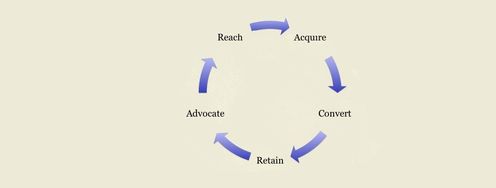
In order to be able to articulate a high-level explanation of the customer experience it can be handy to define a customer lifecycle map. This is a diagram of the multiple stages that a customer goes through from before they become a customer to after they terminate their relationship with a brand. Customers typically do not move through this experience in a “start to finish” manner but move from stage to stage in loops (going backwards as well as forwards in their journey).

The customer lifecycle map should be used as a high-level tool within an organization to understand large groups of customers. It is not designed to replace the customer journey map which explores a more intimate path taken by customers through actual interactions with the business or brand.

As Steve Jobs, the CEO and founder of Apple said; “You’ve got to start with the customer experience and work back toward the technology – not the other way around.”


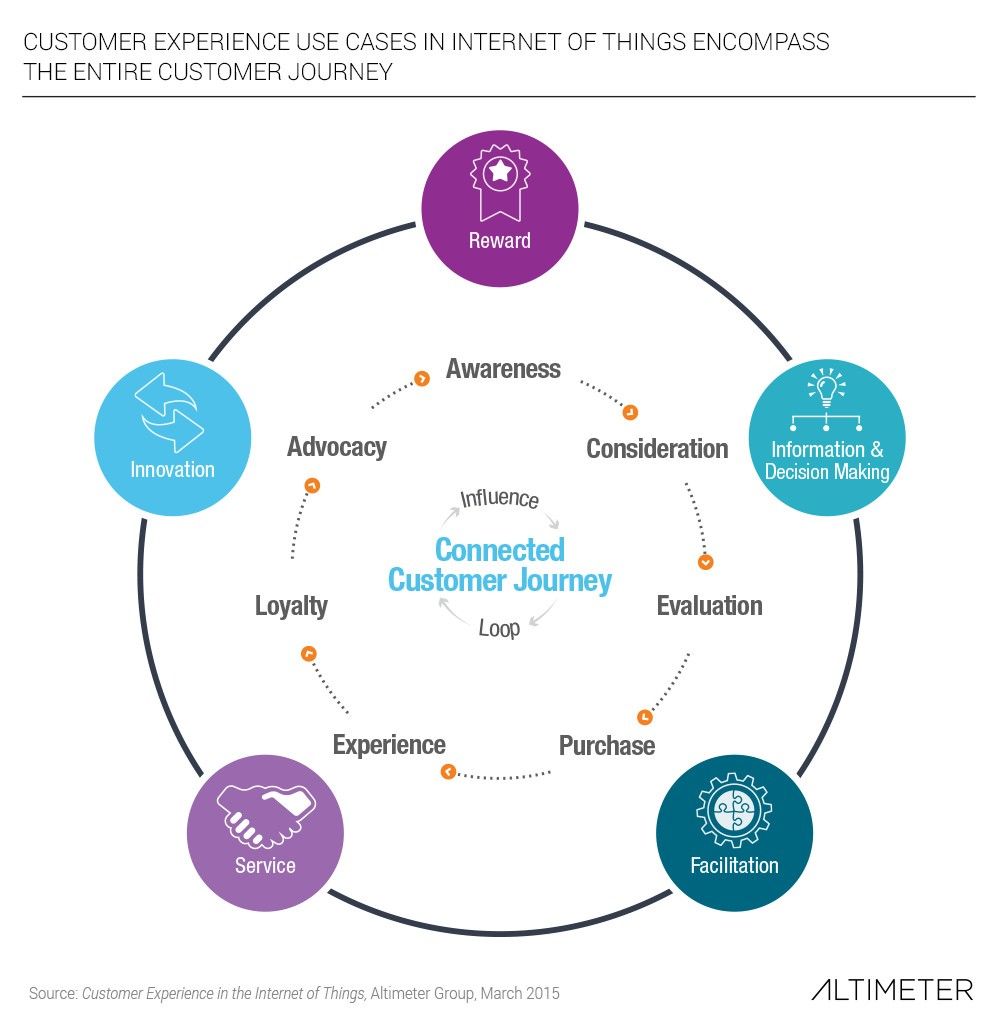
Author/Copyright holder: AltimeterGroup. Copyright terms and licence: CC BY-NC-SA 2.0

Altimeter share their version of the customer experience lifecycle without any additional detail as to how each part of the cycle operates. Your customer experience maps should be more detailed.

What is Included in a Customer Experience Map?

Annette Franz Gleneicki, one of the 50 most active influencers in Customer Experience according to MindTouch, offers these phases for customer experience:

Awareness

This is the time that a customer first becomes aware of your brand. They may not have had any interaction with the brand at all at this stage. While awareness can come from marketing campaigns and media, it is just as likely to come from a word-of-mouth recommendation from a friend or family member.

Consideration

Once a potential customer becomes aware of a brand, when they need a solution to the problem that brand supplies, they will begin to consider products from that brand as well as products from other brands that meet their needs. At this stage they have not made a decision as to which brand they will engage with.

Selection/Purchase

When the customer’s need becomes pressing enough and they have completed as much research as they intend to undertake; they begin the process of selecting a vendor. Assuming that your marketing, information, etc. has been sufficiently interesting and engaging – this is when they should choose your product over a competitor’s.


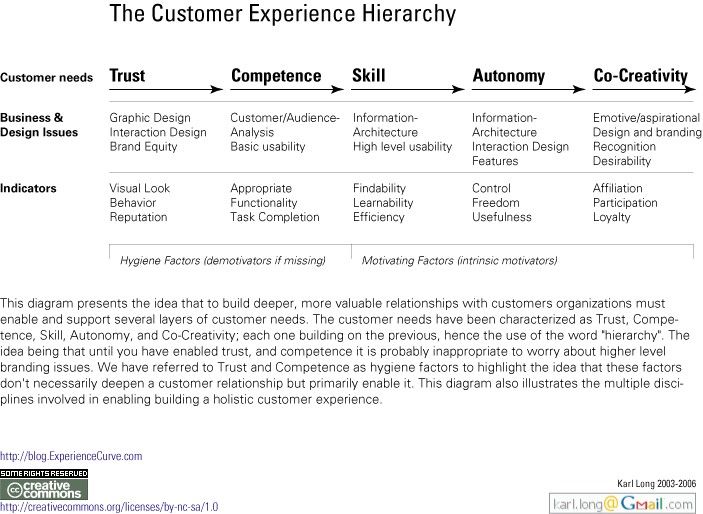
Author/Copyright holder: extraUNanonymous. Copyright terms and licence: CC BY-NC-SA 2.0

It can be useful to remember what you want to create at each stage of the customer lifecycle – this handy chart from ExperienceCurve.com can help you focus on what really matters.

Product Experience

Once they have purchased a product, the customer (or in some cases a user who is not the customer) must become familiar with that product. They learn how to use it and how to consume it. At this stage it is important that the user feels satisfied that you have met their basic needs or they cannot progress further through the lifecycle and move straight to the final step.

Loyalty

If the user remains satisfied with their product experience over time; eventually they will become loyal to the product (and possibly to the brand too). They may begin to purchase other offerings from the brand at this stage (assuming they are there to be purchased).

Advocacy

Not all users and customers make the transition into advocacy but a percentage of loyal customers will eventually become brand ambassadors. They will recommend your products to their friends, colleagues, families, etc.

Engagement

Advocates become engaged when they feel emotionally connected to the brand. They feel love and trust for the product and the company. They feel 100% part of your overall experience. It’s worth noting that once again only a small percentage of advocates go on to become fully engaged.


Author/Copyright holder: Dion Hinchcliffe. Copyright terms and licence: CC BY-SA 2.0

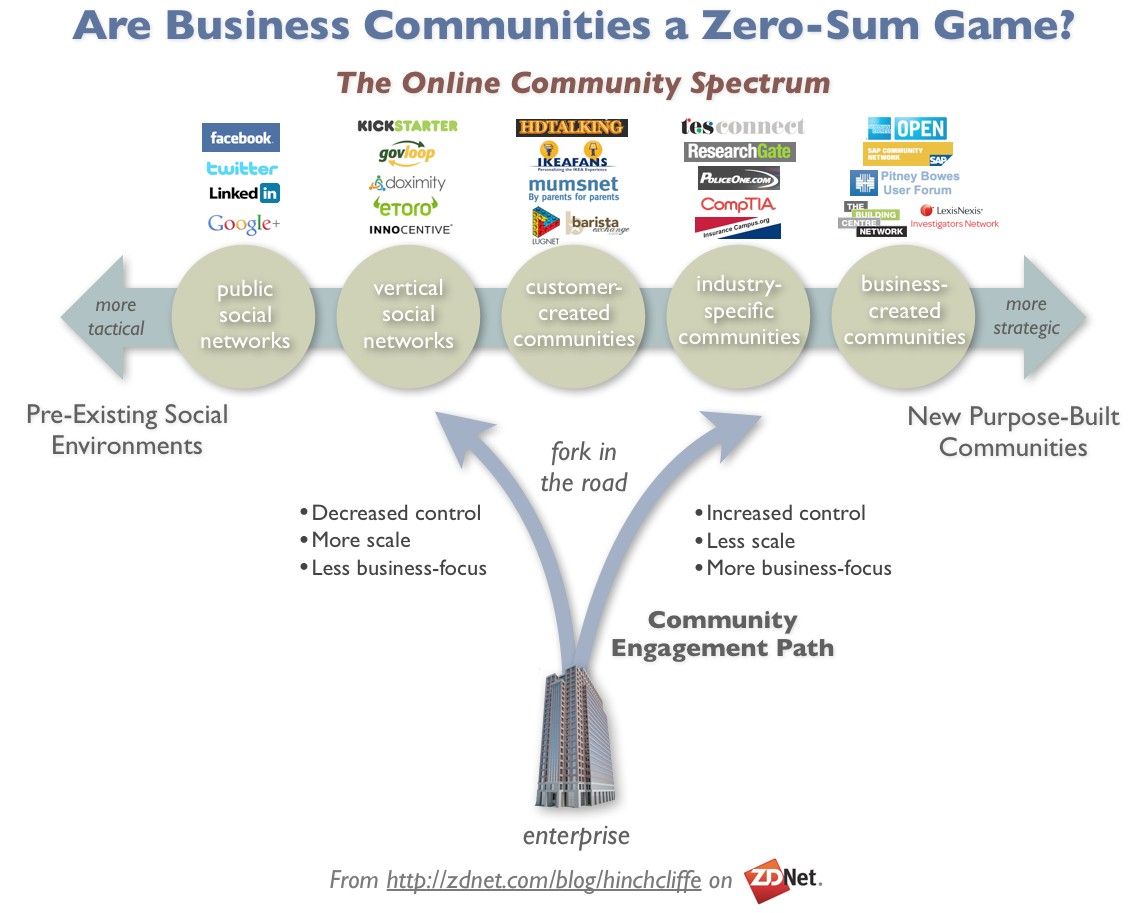
Of course, the precise level of engagement depends on the community that you serve. This handy infographic from ZDNet can help you decide what engagement should look like for your brand.

Raving Fanatics!

These folks have become part of the brand. They’re the people who tattoo your logo on their bodies. They spend all day, every day contributing to user forums and attending trade shows to talk about how amazing their experiences are. These make up the tiniest portion of customers but their actions can have huge impact on others.

Exit

Customers leave; it’s a fact of life. However, you have a lot of control over how many customers decide to terminate (or churn) their relationship. It’s also worth noting that this isn’t always the end of the customer experience – customers who quit can come back later in the game to rejoin and begin the cycle all over again.

Mapping the customer experience simply involves examining each of these stages and asking how you can either transition a customer to the next phase in a better method or how you can prevent them from exiting. Customer lifecycle maps are usually shown in circular form with the possibility of transitioning between any stage and any other highlighted. (Some people go from awareness to raving fan immediately – some never will).


Author/Copyright holder: jonny goldstein. Copyright terms and licence: CC BY 2.0

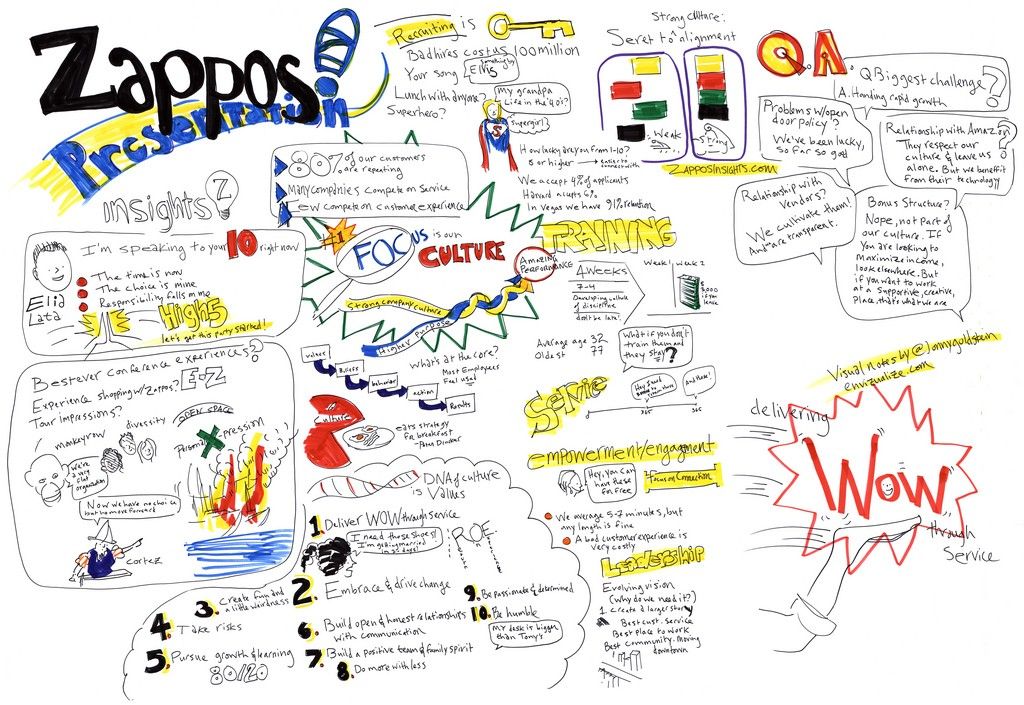
The customer lifecycle map is a tool that allows you to take action. This is what Zappos did to ensure that interactions with their customers would be wowed by their actions.

The Take Away

Customer lifecycle maps help a business keep track of the overall customer experience. They do not replace customer journey maps but rather complement them for a more high-level overview of an experience. Sales and marketing often find lifecycle maps very useful, for user experience design they provide a starting point for ideation and understanding of the customers the business has.

Jerry Gregoire, Dell’s CIO, said; “The customer experience is the next competitive battleground.” the customer lifecycle map is a key strategic tool in winning that fight.

Resources

Annette Franz Gleineicki explores the differences between customer journey mapping and lifecycle mapping here - http://customerthink.com/whats-the-difference-journey-map-or-lifecycle-map/

Her original definitions of the important roles of the customer experience lifecycle can be found here at CX Journey - http://www.cx-journey.com/2011/12/customer-experience-lifecycle.html

Glen Burnett explores the advantages of using customer lifecycle maps here - http://glenburnett.blogspot.com/2013/01/customer-lifecycle-mapping-helps.html

Feel Stuck?
Want Better Job Options?

AI is replacing jobs everywhere, yet design jobs are booming with a projected 45% job growth. With design skills, you can create products and services people love. More love means more impact and greater salary potential.

At IxDF, we help you from your first course to your next job, all in one place.

See How Design Skills Turn Into Job Options
Privacy Settings
By using this site, you accept our Cookie Policy and Terms of Use.
Customize
Accept all

Be the One Who Inspires

People remember who shares great ideas.

Share on:

Academic Credibility — On Autopilot

Don't waste time googling citation formats. Just copy, paste and look legit in seconds.