Horror Vacui

Your constantly-updated definition of Horror Vacui and collection of videos and articles.
Be a conversation starter: Share this page and inspire others!

197 Shares

What is Horror Vacui?

Horror vacui refers to the inclination to fill every bit of space on a webpage or app with content. In user experience (UX) design, it can harm the overall  user experience. Pages can be crammed with text, images, advertisements and other elements, with little or no negative space—and often results in overly complex, cluttered compositions.  
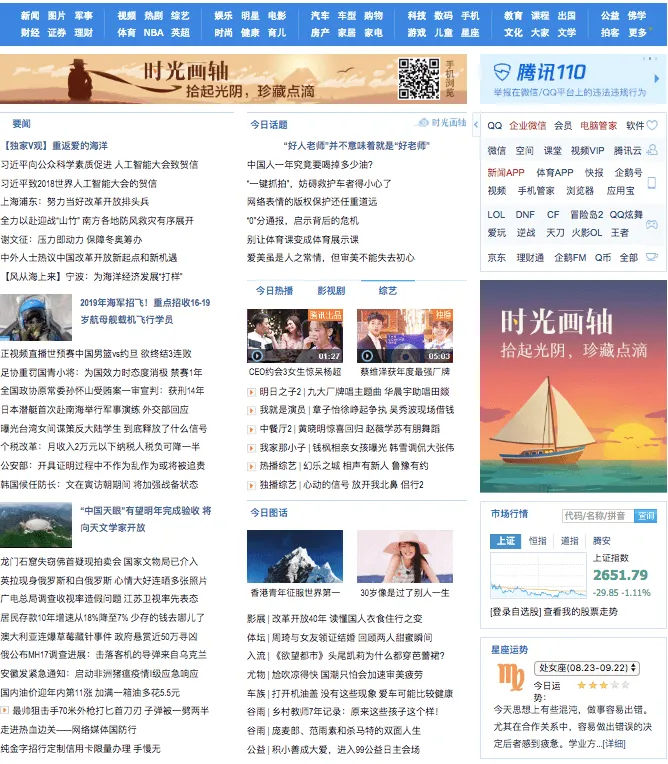
Image of a popular Chinese web page.

This is a popular landing page design in China—full of detail with little free space.

© Yuki Zhong, Fair Use
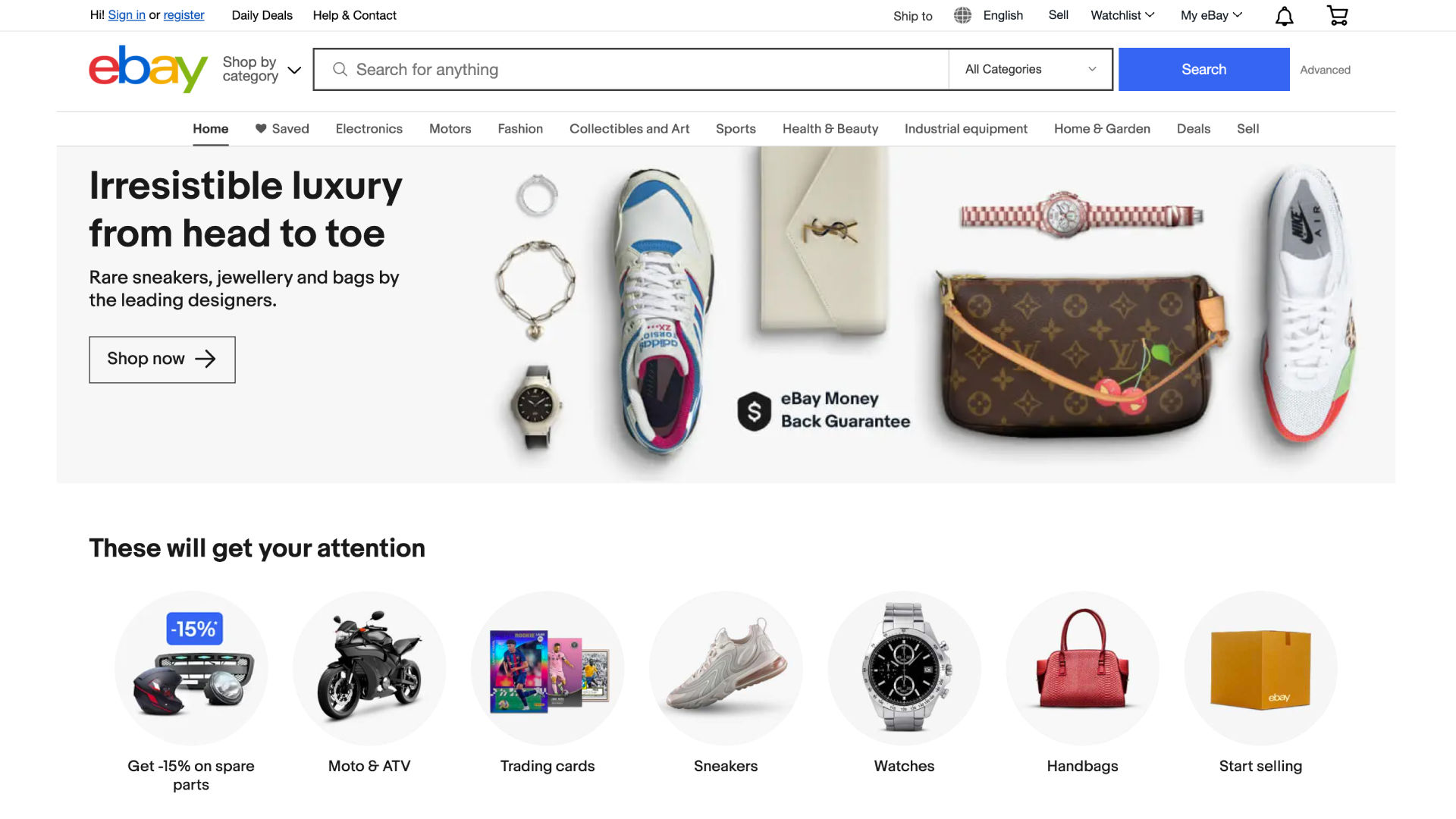
Image of eBay landing page.

eBay’s landing page – a site with plenty of possibilities, yet balanced well with negative space.

© eBay, Fair Use

Horror Vacui in Art and Design History

Horror vacui is a term that has its roots in Latin—and it means “horror of the void” or “fear of emptiness.” This fear of empty space has been a part of art and design for centuries, and the concept of horror vacui itself comes from art history. Many historic art movements—and these include the Victorian, Georgian and Baroque periods—often filled canvases with intricate details. And, because of this tendency, many artists from those eras felt more or less compelled to leave no space untouched.  

Despite the potential it’s got to overwhelm, this tendency for complexity and detail was immensely popular back in those times. After all, if a client or patron could actually afford such detailed artwork, then it was a sure sign of prestige on their part. And an ornate jam-packed art work signaled both affluence and craftsmanship.
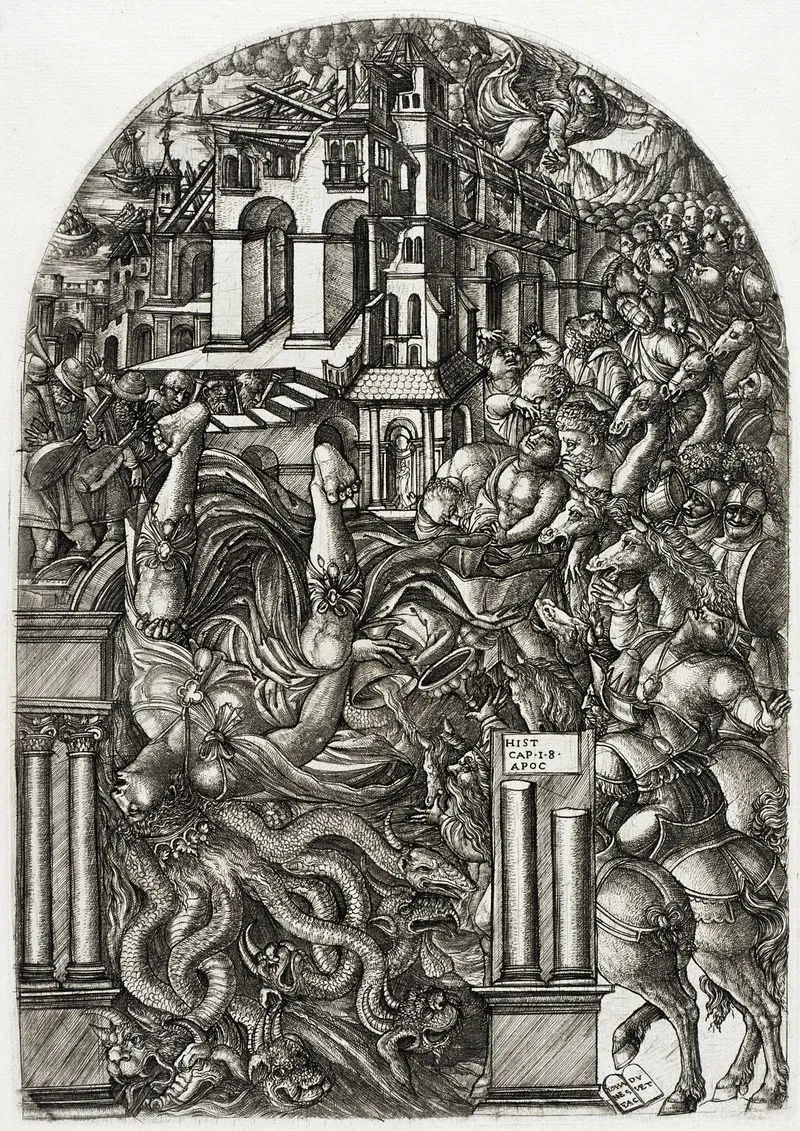
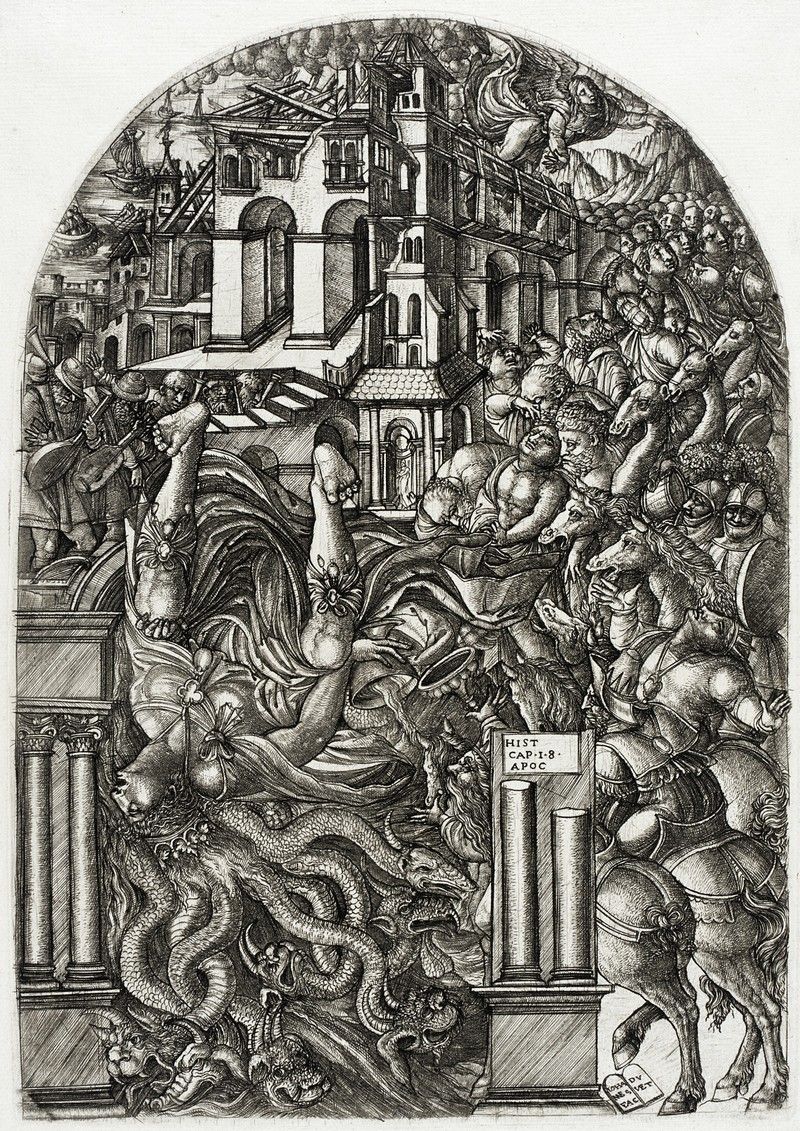
Image showing an ancient picture embodying horror vacui.

It’s all in the details; only some bits around the horses’ hooves have managed to “breathe” in The Fall of Babylon (1555).

(Public Domain)

The trend changed later. In modern art and design movements—like minimalism—artists prioritized simplicity. Many artists would pioneer a really effective use of background or negative space in art—and this shift shows the evolving perception of design aesthetics over time. Artists—and art patrons—were paying serious attention to elements in a different way. ​ 

What is Horror Vacui in UX Design?

Art is different from design. It’s a subject that sometimes causes confusion in the popular psyche of the real world. However, even for user interface (UI) design there’s a common misconception that empty space is a waste or even a sign of lazy design. The effective use of negative or white space is—in fact—crucial for good design work.   

That’s particularly the case for designers of user interfaces, and when designers provide such space, they let their designs “breathe.” What’s more, they allow for better readability and comprehension. They’re key parts of improving a website’s—or an app’s—user navigation.  

Designers who fall prey to horror vacui can end up with overly crowded and visually overwhelming interfaces. This can work against the user experience—and it can harm a digital product’s or service’s chances of doing well in the market due to: 

1. Reduced Readability and Comprehension

Overcrowded web pages and app screens can make it really hard for users to read and understand the information that’s on show. That strain on the viewer’s eye can mean less user engagement—and potentially higher bounce rates. Users might even get so distracted that they can’t even find essential tasks or information—never mind focus on them. In an era of mobile-first design—one where many users discard apps after just a single use—it’s truly vital to design for the distracted user who’s got next to no patience. 

2. Poor Navigation 

If a designer does clutter a screen with information—users may find it extremely challenging to navigate and spot the information they’re after. What’s more, they might even struggle to see what the actual subject of an image is. A designer might’ve inadvertently buried calls to action in the design elements of a cluttered website, for example. This will translate to a poor conversion rate. If the users become frustrated, they will leave sooner—very soon if they’re already in a frustrated, busy or even potentially hazardous environment. 

3. Reduced Aesthetics 

A cluttered site can be visually unappealing. What’s more—and what’s probably even worse—that ugliness can sour a user's perception of the brand they’re encountering. Without a decent amount of or adequate space around the subject to set it off, it can’t draw attention to what’s important for the brand message to get through. Users like pretty things—and they’re very quick to distrust a product design that they can’t identify with.

In this video, Frank Spillers, Service Designer, and Founder and CEO of Experience Dynamics, shows how Google’s Material Design principles demonstrate that clean, visually balanced layouts aren’t just attractive, they also enhance usability. By reducing clutter and emphasizing clarity, contrast, and consistency, you can make interfaces feel both beautiful and trustworthy.

Transcript

4. Outdated or Unprofessional Look 

Digital products that fall victim to horror vacui tend to seem amateur—or outdated. For example, users who can recall the early days of the internet—from back in the 1990s—may remember that “cluttered retro” feel that came across from many websites back in the day. And cluttered digital products that are stuffed with design elements can look very cheap and unprofessional. For instance, even a slightly busy web design can be a big turn-off for many users and potential customers—or would-be customers.   

5. Information Overload

Users may simply get overwhelmed if they’ve got too many elements going on in front of them. Cognitive overload will make them shut off in a few seconds. And even if they do have time to spend on their desktop in a quiet environment, many will become frustrated if they’ve got to find something. Many users will leave the site or app, regardless, and likely won’t return. 

These are primary reasons to manage horror vacui appropriately. Visual designers have both challenges and opportunities to make the best of a digital environment where aesthetics and clear design are things of high value. That’s why it’s important to fight the urge to fill every pixel on the screen. Users want helpful cues such as affordances and signifiers to aid them in their user journey. What they don’t want is to find an excess of information, graphics and options for the product or service they simply want to use. 

How Do Designers Manage Horror Vacui?

Here are some strategies: 

Understand The Target Audience

User research is vital, every time. Designers must understand the context of use, cultural context and preferences of the users they’re going to help. And what works for one group well mightn’t work for another. So, a thorough grasp of the users’ scenarios—as well as a grasp of the users themselves—is an absolute “must” for any design project.  

Author and Human-Computer Interaction (HCI) Expert, Professor Alan Dix explains how important understanding users is—and more—in this video:  

Transcript
 

Prioritize Content

Not all content is equally important—and that’s a big reason why designers need to prioritize their content and highlight the most important information. It’s a crucial thing for them to curb the temptation to cram too much information in in areas like the information architecture of a digital design. So, designers must make really sure that users can readily access the most pertinent details—and not feel overwhelmed at all from non-essential information.   

Use a Good Visual Hierarchy

This hierarchy is something that, quite simply, guides the user's eye in user experience design. More than that, it improves the experience—since it makes for easier information processing. When designers strategically set out the right visual elements, they can boost the experience and prevent visual clutter from wrecking the experience. Use size, color, contrast and spacing to establish a strong visual hierarchy—one that will guide users to the most important elements first.   
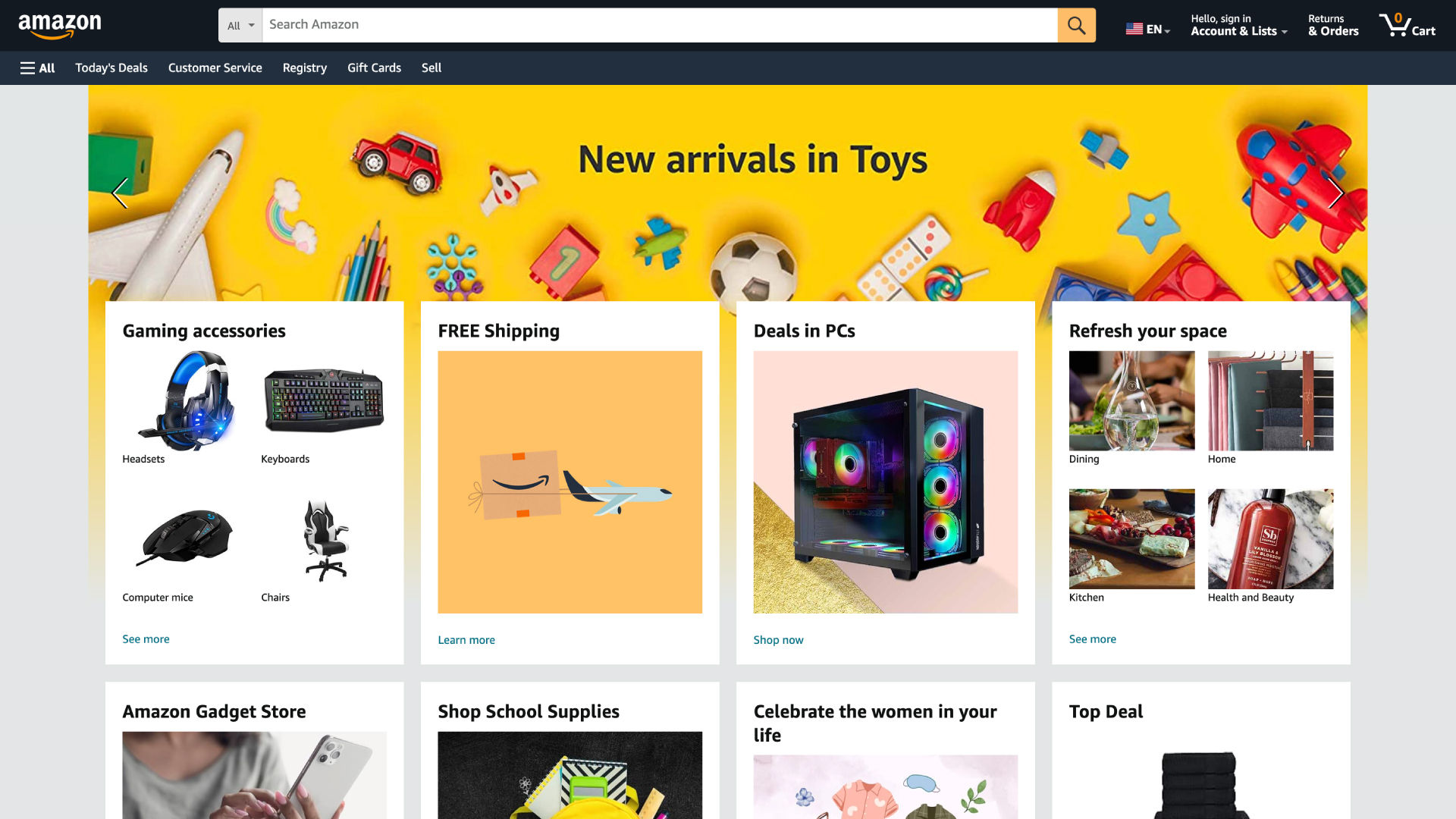
Screenshot from Amazon.com's site.

E-commerce giant Amazon—which has a wealth of information to display—manages to keep its interface relatively clean. It uses hierarchy, categorization and a clear navigation system to present information in an organized and digestible manner.

© Amazon, Fair Use

Simplify the Interfaces

Remember the famous design principle, "Less is more." For general public releases, at least, a clean, simple design is nearly always far more effective than a complex one. It’s vital to keep interfaces simple and straightforward—to manage and minimize horror vacui. So, designers really need to aim for clarity and ease of use, and keep unnecessary elements from appearing. Be ruthlessly selective—it’s an approach that boosts the user's ability to navigate the interface and access information, without feelings of overwhelm coming in and ruining the experience. 

“A designer knows he has achieved perfection not when there is nothing left to add, but when there is nothing left to take away.” 

— Antoine de Saint-Exupery, Aviator and writer

Implement Progressive Disclosure

Progressive disclosure—it’s a term that means revealing information gradually as it becomes relevant. And that’s opposed to presenting all information upfront. Designers use progressive disclosure effectively this way when they prevent information overload. At the same time, it contributes to a clean and uncluttered interface throughout.   

Embrace White Space

White space—or negative space—is a powerful tool in combating horror vacui. This space is that empty space in a design that surrounds different elements like text, images and buttons. It’s “nothing” that has a big purpose—and it helps to make the visual hierarchy, improve the readability on show, and guide the user's attention. 

Contrary to what the term suggests, white space doesn’t necessarily have to be white. Actually, it can be any color, texture, pattern—or even a background image. The key is that a healthy balance of positive and negative space is something that gives visual breathing room for the eyes. It’s also important in UX design—and that’s because it can help guide users' eyes and attention to key elements on the page. What’s more, it can help achieve a balanced and harmonious design that’s pleasing to the eye.  A generous use of white space often is a sign of luxury and sophistication—in the modern design aesthetic. 
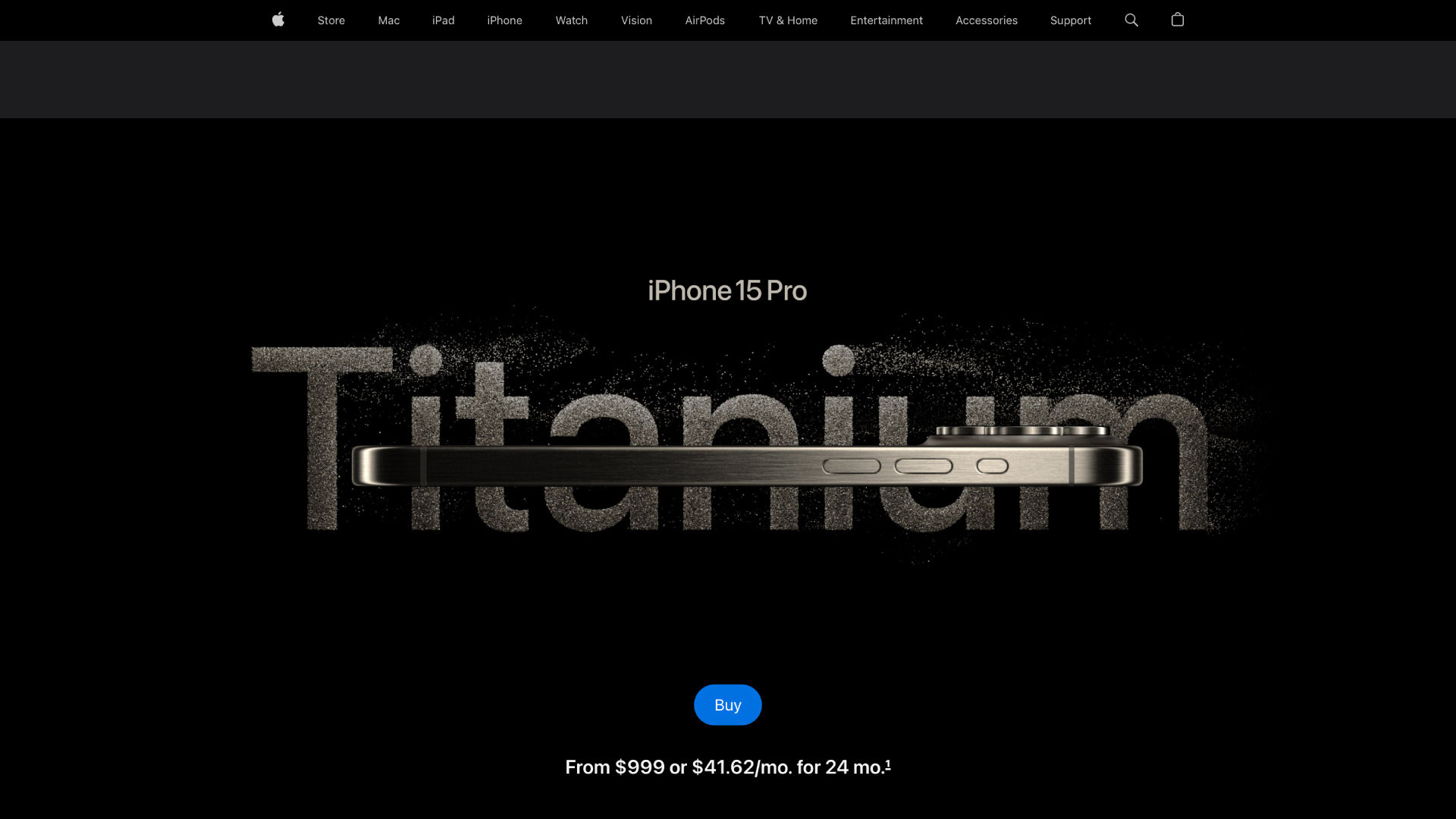
Image of an Apple screen.

Apple’s interfaces feature plenty of white space, clean lines and a focus on core functionalities. This approach not only aids usability but also enhances the perceived value of their products.

© Apple, Fair Use

Consider the Advantages of Gestalt Principles and Grids

Designers have an exceptionally strong ally in the form of the Gestalt principles. The law of proximity—for example—is a powerful one to work with, and it can help simplify a web page and establish hierarchy. 

What’s more, designers can explore the use of typography and grid systems to organize content and optimize the use of space within their designs. Every aspect of the elements they intend to include is something to consider and—if essential to the message of the design solution and brand—optimize for the user. 

Designer and educator Mia Cinelli explains how the Gestalt principles are important in design. 

Transcript
  

Leverage Hick’s Law

The time it takes users to make a decision depends on how many options a designer gives them. ​K​eep the essential choices that are relevant to the design goal and highlight them on the main page. Non-essential ones can go on other pages via link buttons. 
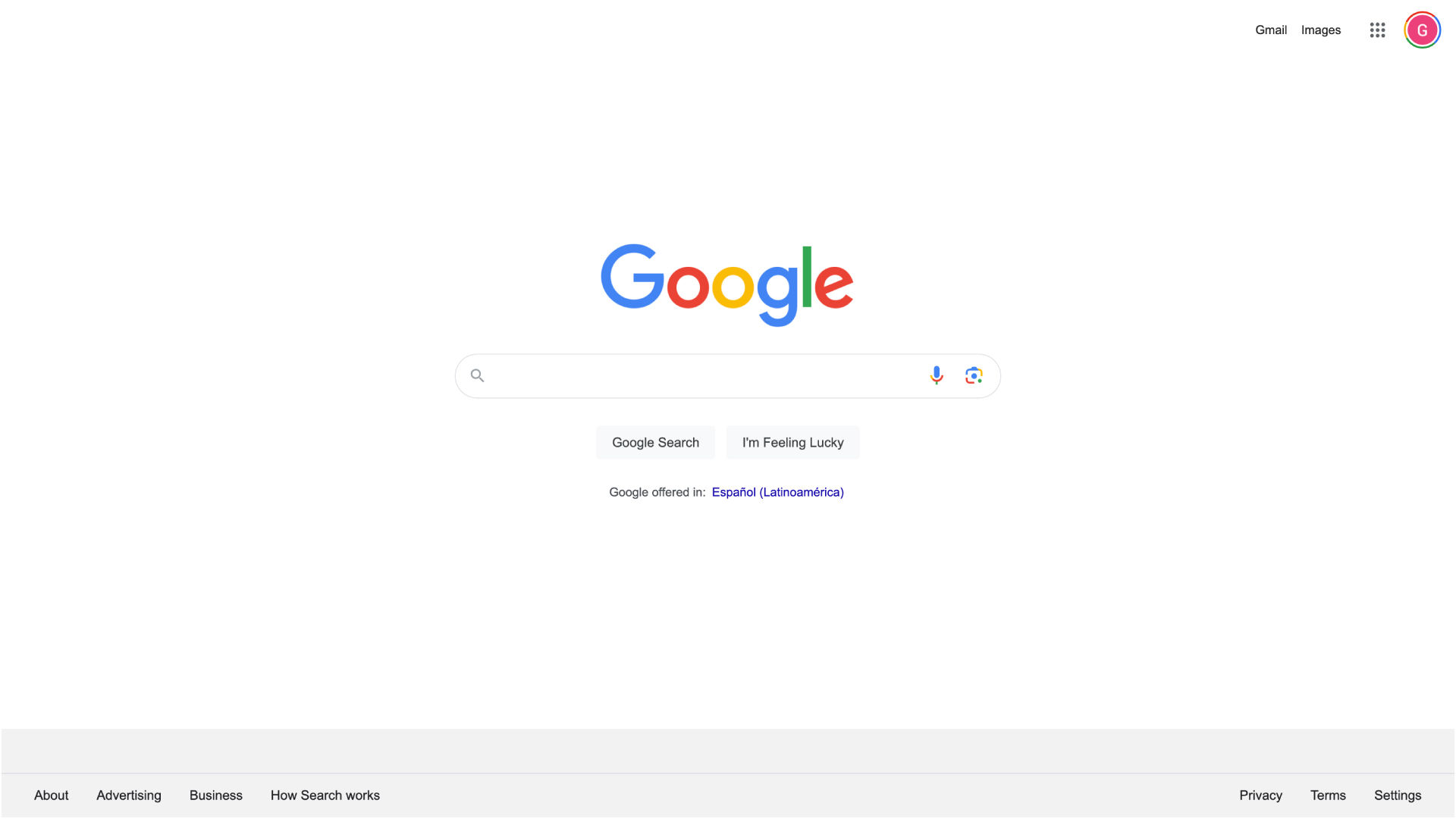
Screenshot of Google's website.

Google is another example of a brand that effectively manages horror vacui. Its search engine interface is incredibly sparse. There is a vast amount of white space. This simplicity lets users focus on their search without any distractions.

© Google, Fair Use

Balance Between Usability and Flexibility

The more a designer adapts the design to make sure that more users can use it effectively—the greater are the chances that the design will swell to end up as a one-size-fits-all product. Although accessibility is indeed a vital thing—and often a mandatory consideration—it’s important to keep things streamlined, too.    

Apply Occam’s Razor

Pick the simple over the complex with Occam’s razor—that’s the principle that prefers simplicity to complexity. Designers shouldn’t use more elements—unless they really have to as a vital part of the design.  

Have an Easy Performance Load

Designers shouldn’t put “work” in front of users. For an intuitive design to be pleasurable and seamless, users really need to have the luxury of neither working at it nor having to pause to wonder about it. 

Leverage the 80/20 Rule

That’s called Pareto’s Principle—80% of users use only 20% of the features that a product’s typically got. It’s wise to focus more on the vital elements—and be wary about the nice-to-haves.   
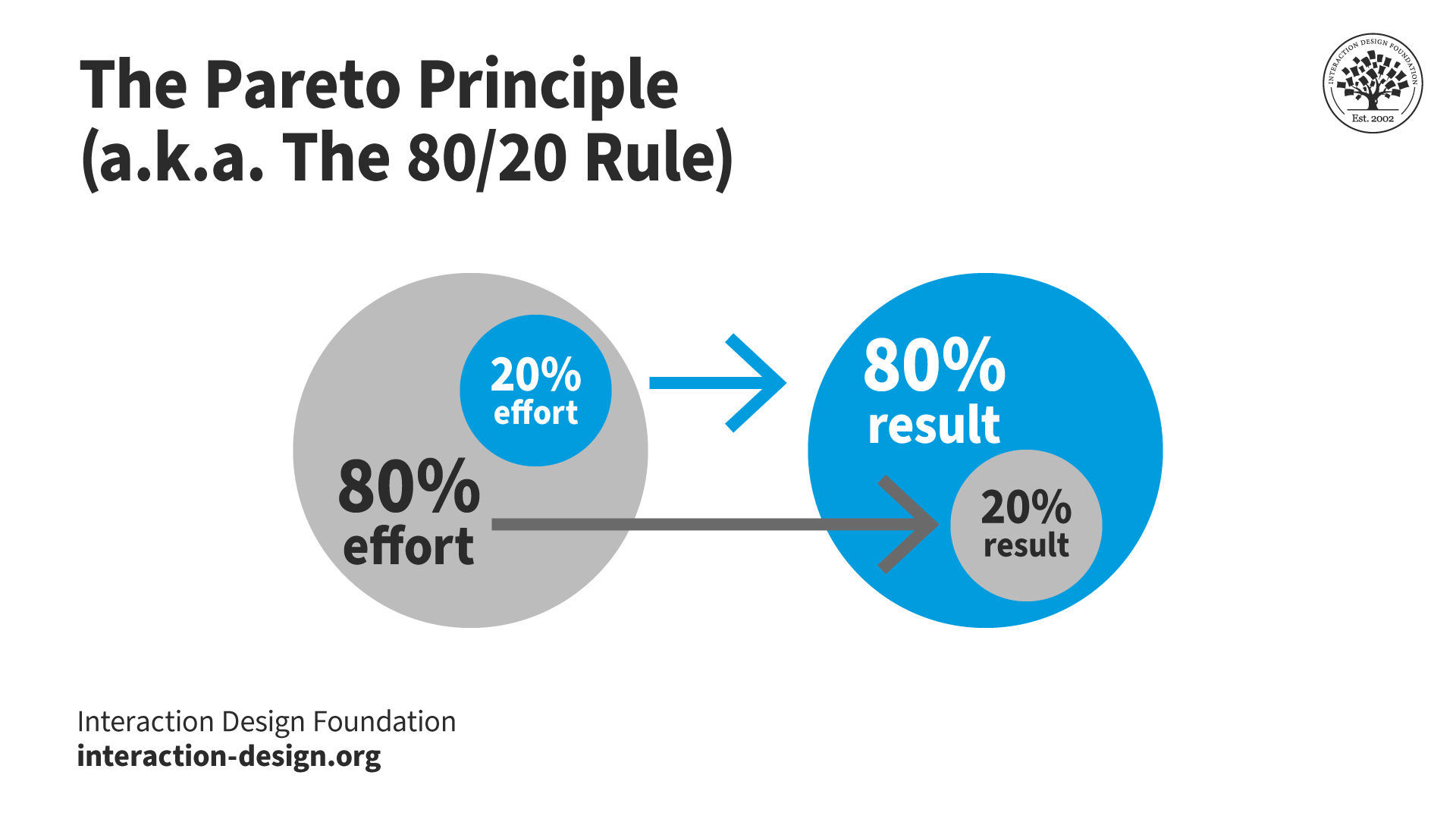
Image showing the Pareto Principle or 80-20 rule.

© Interaction Design Foundation, CC BY-SA 4.0

Use Chunking

Split bigger pieces of content into smaller ones—if it’s possible. Designers who cater to their users this way really make it easier for them to digest material—and that’s especially so when it comes to written content.  

Test and Iterate

It’s vital to do usability testing with users—and that’s real users. As with UX research, testing is an ultra-important part of the whole design process. It’s also the only way for designers to really understand how individual users interact with a design. Then, designers can collect that user feedback and work with the insights they’ll have gotten from it. From there, they can fine-tune and truly improve their designs to better address users' needs and preferences. And—in terms of horror vacui—they can get the optimal balance of negative and positive space per screen based on their findings. 
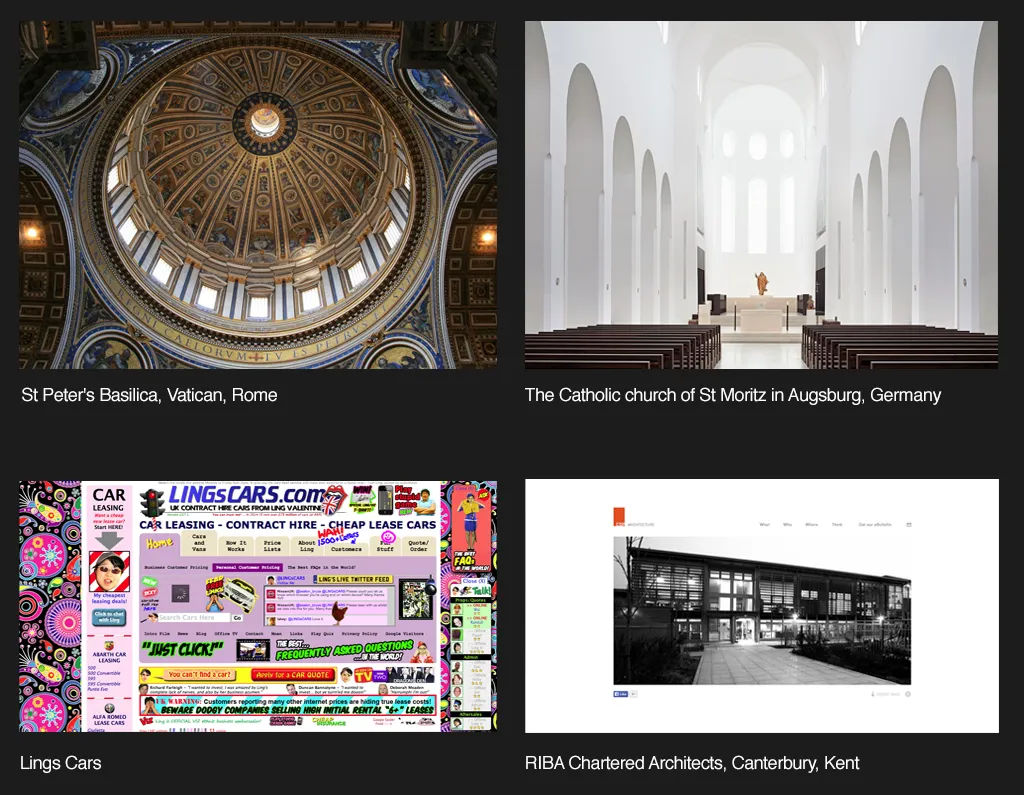
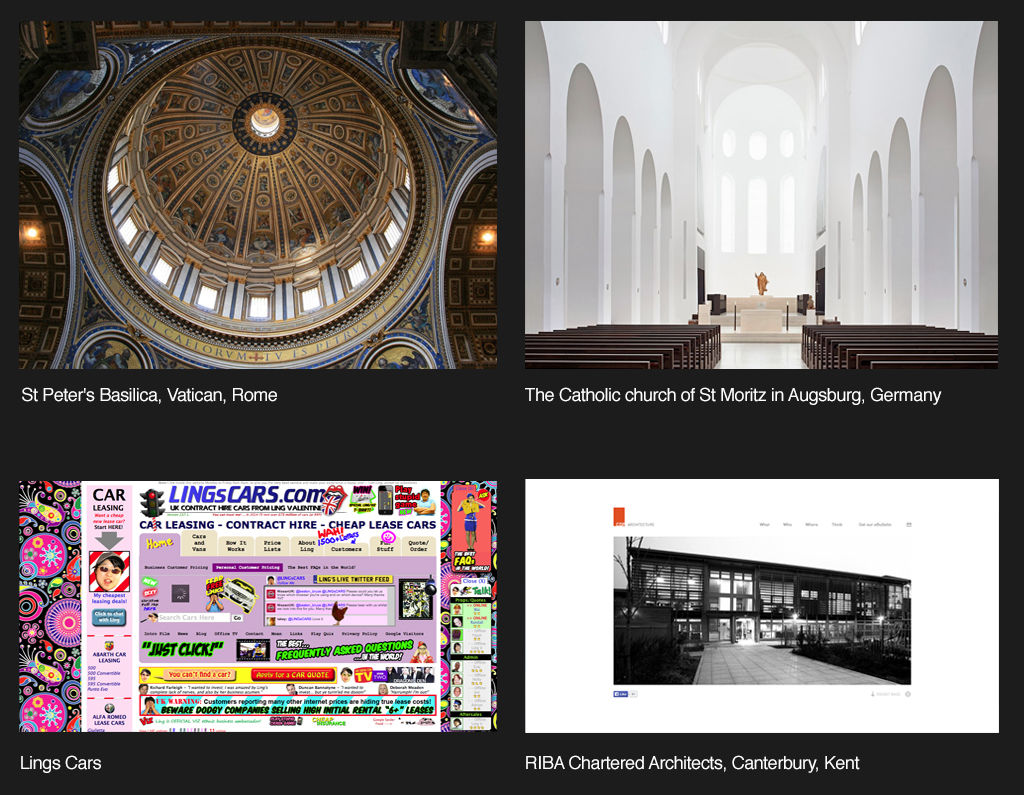
Image showing four images of interior of buildings and a webpage.

The many aspects of detail—or lack of detail—at work.

© Interaction Design Foundation, CC BY-SA 4.0

How do Horror Vacui and Space Work in Different Cultures?

The target users’ culture is an essentially important consideration for negative space. Western cultures tend to associate clean, minimalist designs with sophistication. In some Eastern cultures—such as China—though, it’s different. A densely packed design is often a sign of wealth and abundance there. So, it’s crucial to understand the cultural context of the user base.   

Designers need to appreciate their users’ culture as well as the many contexts of use for their digital products in any case. These brands will be more likely to enjoy international success. They can design effective and appealing UIs that travel exceptionally well in an international market. 

Overall, perhaps the best way to approach horror vacui is to be aware of it—and manage it. One way to see it is as more a historical anomaly to consider and minimize than a warning to scare designers away from including details on a page or screen. Whatever the case, the goal is always to mirror the users’ needs—and get the brand message across without confusing anyone, and know how much detail to include. White space isn’t wasted space. “Nothing” is a handy tool here and applies to a wide range of possibilities in product design. The key to the enterprise with navigating horror vacui is good judgment and the careful application of a designer’s skill set.   

Questions About Horror Vacui?
We've Got Answers!

Can horror vacui and minimalism coexist in a single design?

Horror vacui and minimalism can coexist in a single design—but their integration takes careful balance in the visual elements. 

To combine these approaches, UX—or UI—designers can use zones or layers. For instance, one area of the screen might feature a dense, intricate pattern (horror vacui). And then another—meanwhile—keeps a good deal of simplicity and open space (minimalism). The main thing is to—while you make a unique experience—keep a harmonious balance, so one style doesn’t overpower the other. 

Watch our​ ​How to Balance Complexity and Simplicity in UX Design Master Class with Morgane Peng, Design Director at Societe Generale to explore the principles of balancing different design elements, crucial when combining horror vacui and minimalism. 

How can designers effectively use horror vacui in UI design?

First—prioritize functionality. The UI should stay intuitive and easy to navigate—even with an abundance of visual elements. So, focus on clear visual hierarchies. They can make sure that important elements like call-to-action buttons or navigation links stand out amidst the detailed interface.  

Second—use horror vacui to make focal points. From concentrating detailed designs in specific areas, professionals can guide users’ attention exceptionally well. And this technique is something that can be particularly useful in areas less critical for functionality—like background patterns or decorative borders. 

Third—implement responsive design principles. An interface that’s rich in details can become overwhelming—or lose its intended effect—on different screen sizes. Designers should make sure that the horror vacui elements really do adapt gracefully across devices. 

Plus, think about the context and audience. Horror vacui can work well for creative, artistic or cultural websites—situations where users expect and appreciate visual richness. But, for applications that need quick information retrieval or frequent user interactions, it’s crucial to balance these detailed elements with ample negative space. 

Take our course The Ultimate Gide To Visual Perception and Design for further helpful insights. 

How does the design community view horror vacui?

The design community—typically—views horror vacui with both fascination and caution. On one hand, designers appreciate horror vacui for its artistic richness and how it can get a sense of abundance and detail across to the viewer. It's particularly admired in fields like illustration, graphic design and certain cultural or artistic contexts where an intricate and opulent aesthetic is something that’s desired. 

On the other hand, in user interface (UI) and user experience (UX) design, clarity, usability and simplicity typically really do take precedence. And a design that’s overly filled—or stuffed—with elements can be overwhelming for users and end up working against itself.  

In any case, it's crucial to balance the intricate and detailed aspects of horror vacui with the needs and expectations of the target audience—including accessibility concerns. And in contexts where user interaction and functionality are key things—like web design—a more restrained approach may be necessary. 

Overall, designers can rely on a strong grasp of form follows function among other allies—such as UI design patterns, to help judge what’s best in their work. 

Watch our video on UI Design Patterns for more insights: 

Transcript
 

Which forums or platforms discuss horror vacui in design?

Forums and platforms discussing horror vacui in design often include online communities and websites that are dedicated to design, art and architecture. And here are some recommended platforms: 

Behance and Dribbble: These platforms showcase creative work—including projects that feature horror vacui. Designers often share their work and get into discussions about their design choices. 

Remember—the popularity and use of these forums can vary, and active discussions on horror vacui might ebb and flow with trends and interest levels in the design community. Join our design community to stay up to date on horror vacui and other topics. ​     ​ 

How do designers ensure accessibility in horror vacui designs?

Designers should focus on a few key principles, including: 

  • ​​Contrast and legibility: They're vital things for readability—and that's especially so for visually impaired users. Text and key elements must really stand out against intricate backgrounds.​​​ 

  • ​​Hierarchy and clarity: Despite the detail, put a clear hierarchy in to guide users to important information or elements.​

  • ​​Simple interaction: Keep interactive elements like buttons straightforward for ease of use.​ ​​​​​ 

  • ​​Consistent navigation: Helps users navigate complex layouts—and that's crucial for cognitive accessibility.​ 

  • ​​Alternative text for images: Provide descriptions for users who rely on screen readers—remember that accessibility is a huge issue in design. ​​ 

  • User Testing: Include diverse users—especially those with disabilities—to get feedback together for improvements. 

Take our accessibility course to appreciate a wide range of considerations to include in UX design for users of all abilities. 

What are some highly cited scientific sources about the subject of “horror vacui”?

Murphy, A. (2022). Perceived Usability of Online Library Resources Among First-Year Students. School of Information and Library Science, University of North Carolina at Chapel Hill

The study, conducted by Andrew Murphy at the UNC School of Information and Library Science, examines the usability of the UNC Libraries website by first-year students. Focused on students enrolled in the first-year writing courses ENGL 105 or 105i, the research utilized a mixed methods approach, incorporating both surveys and contextual interviews. The objective was to assess how these students perceive and experience the website's usability in the context of their coursework. The findings revealed that while students could complete their course-related tasks using the website, the overall perceived usability and user experience were not rated highly. This suggests a need for improvements in the website's design to enhance user satisfaction and effectiveness. “Horror vacui” receives mention. 

What are the psychological effects of "horror vacui" on users?

Users who experience horror vacui may feel overwhelmed, confused or distracted—and that’s due to a cluttered or excessively busy design. This sensation comes about because the human brain seeks order and simplicity to efficiently process visual information. And whenever they’re confronted with an overly complex or crowded design, users can find it difficult to focus on the main message or action desired by the design. This can lead to a decrease in usability and overall user satisfaction.  

Take our Visual Design: The Ultimate Guide course to find out how to make effective designs. 

Earn a Gift Earn a Gift, Answer a Short Quiz!

1
2
3
4
1
2
3
4
Question 1
Question 2
Question 3
Get Your Gift
Interaction Design Foundation logo

Question 1

What does the term "Horror Vacui" mean in design?

1 point towards your gift

  • Fear of empty spaces
  • Love of minimalist spaces
  • Preference for monochromatic color schemes
Interaction Design Foundation logo

Question 2

How can Horror Vacui affect user interfaces?

1 point towards your gift

  • It enhances user interaction with the interface.
  • It improves readability and user focus.
  • It reduces aesthetic appeal and complicates navigation.
Interaction Design Foundation logo

Question 3

Which design approach contrasts with the principles of Horror Vacui?

1 point towards your gift

  • Grid-based design
  • Gothic design
  • Minimalist design

Learn More About Horror Vacui

Make learning as easy as watching Netflix: Learn more about Horror Vacui by taking the online IxDF Course Visual Design: The Ultimate Guide.

Why? Because design skills make you valuable. In any job. Any industry.

In This Course, You'll

  • Get excited when you use visual design principles to create impressive visuals people love! Great visual design makes the message clear, memorable, and persuasive—whether it's an app, a logo, or a presentation slide. You'll learn what makes a design excellent and how science and culture influence what works and what doesn't. You'll create designs that truly connect with people. Visual design isn't just about beauty—it's about shaping ideas that inspire action, build trust, and give meaning to your work. As AI makes visual production faster and cheaper, you stay in demand when you can turn rough or AI-generated visuals into successful designs that get approved, adopted, and used. If you want to stand out with timeless human-centered design skills, this course is for you.

  • Make yourself invaluable with practical design skills that amplify your impact in any industry! Did you know that you only have 50 milliseconds to make a good first impression? Great visual design ensures you pass the test every time. You'll learn to use visual elements to guide emotions, influence purchasing decisions, and optimize User Experience (UX) and User Interface (UI) design. You'll master color theory, typography, and grid systems to improve usability, build credibility, and create designs that stop the scroll.

  • Gain confidence and credibility as you fast-track results with step-by-step exercises and downloadable templates! Complete optional tasks to walk away with portfolio-ready case studies that will help you land your dream job and advance your career. You'll get hands-on and design a low-fidelity wireframe, apply a monochromatic, complementary, or triadic color scheme, choose typefaces, and select a grid system. It's easier than you think! No matter your background, you can master Visual Design. With clear guidance and real-world examples, you'll apply your skills right away. This course will give you the visual design skills you need to solve design challenges, collaborate smarter, and make it easy for decision-makers to say yes to your vision.

It's Easy to Fast-Track Your Career with the World's Best Experts

Master complex skills effortlessly with proven best practices and toolkits directly from the world's top design experts. Meet your experts for this course:

  • Mia Cinelli: Associate Professor of Art Studio and Digital Design at the University of Kentucky.

  • Joann Eckstut: Color Consultant, Founder of The Roomworks, and one of the 12 designers chosen by the Color Association of the USA to create the yearly forecast used by industries to keep up with color trends.

  • Arielle Eckstut: Author, Agent-at-large at the Levine Greenberg Rostan Literary Agency, and Co-Founder of The Book Doctors and LittleMissMatched.

Get an Industry-Recognized IxDF Course Certificate

Increase your credibility, salary potential and job opportunities by showing credible evidence of your skills.

IxDF Course Certificates set the industry gold standard. Add them to your LinkedIn profile, resumé, and job applications.

Course Certificate Example

Be in distinguished company, alongside industry leaders who train their teams with the IxDF and trust IxDF Course Certificates.

Our clients: IBM, HP, Adobe, GE, Accenture, Allianz, Phillips, Deezer, Capgemin, Mcafee, SAP, Telenor, Cigna, British Parliament, State of New York

All Free IxDF Articles on Horror Vacui

Read full article
Horror Vacui: The Fear of Emptiness - Article hero image
Interaction Design Foundation logo

Horror Vacui: The Fear of Emptiness

Our next article is all about a scary-looking subject in that its title may look ominous. Fear not! It covers a concept that will seem familiarvery quickly. Of course, having a better understanding of it will let you work its antidote into your designs with confidence.Horror Vacui — the fear of not

Social shares
855
Published
Read Article
Read full article
Be Afraid! The Silent Role of Fear in Decision Making - Article hero image
Interaction Design Foundation logo

Be Afraid! The Silent Role of Fear in Decision Making

Fear plays such a dominant role in our lives that several businesses and products have succeeded on the back of this single emotion. Here’s a look at some of the fears that affect our decision making, how businesses and products exploit these tendencies to their advantage, and how, as a designer, yo

Social shares
710
Published
Read Article

Horror Vacui: The Fear of Emptiness

Horror Vacui: The Fear of Emptiness

Our next article is all about a scary-looking subject in that its title may look ominous. Fear not! It covers a concept that will seem familiarvery quickly. Of course, having a better understanding of it will let you work its antidote into your designs with confidence.

Horror Vacui — the fear of not filling up

Horror Vacui (a Latin-derived term) means “fear of emptiness”. At first glance, we may identify with that fear as being perfectly natural: it could be the fear of not refueling at the pump before we set out on a long drive, or not having a filling breakfast before a long, busy day. Many of us who shop on Amazon may have noticed that, when our cart is empty, the caption reads: “Your shopping cart lives to serve. Give it purpose — fill it with...” (books, games, DVDs, etc.). They are appealing to our “horror vacui”. But, as designers, we need to understand that such a fear may sound like no bad thing.

However, we want to look at horror vacui differently. For a long time, it was a driving force in design. Although we’ve moved to the opposite extreme now, for the moment, it’s important to understand how you can use (by avoiding) horror vacui to enhance your own web designs.

Modern design prefers simplicity in layout – from Apple to Google, clean, simple layouts with plenty of whitespace are the preferred way to deliver content. However, it hasn’t been always like this. If you went back in time 50-100 years ago, designs were far busier. Adverts from brands like Coca-Cola barely included an inch of whitespace. Your eyes might have strained to notice things back then!

Nowadays, we’re used to being surrounded by clean and clear interfaces. Nothing is nicer than landing on a web page, flipping to a catalog page, or walking past a good store and seeing an element stand out. The simplicity is reassuring, especially in so busy an age when information is flying quickly and furiously. In our modern, frenetically paced world, there is comfort and tranquility in seeing simple designs. The concept of horror vacui, named as such, appears to have arisen during the Victorian era. It was first used as a criticism of interior design in architecture and wasn’t considered to be any kind of compliment. However, the term has Latin roots, and the concept turned up in the time of Aristotle.


Author/Copyright holder: Fae. Copyright terms and licence: Public Domain

If we surf or stroll to paintings throughout history, we can see exactly what this fear involved. Painters such as Bosch, Brueghel, and Duvet showed this need to fill up the “design space” with elements — people, animals, buildings, trees, etc. They made busyness their business! If we look at Jean Duvet’s “The Fall of Babylon”, we can barely pick out any background—the engraving is almost 100% action, actors, and set, with the tiniest amount of sky in the top-left corner (and even that is full of tremulous clouds). Ironically, Leonardo da Vinci had his finger on the problem long before it became a problem: “Simplicity is the ultimate sophistication.” His peers had other ideas.

It was Mario Praz (1896 – 1982), an Italian-born cirtic of art and literature, who used “horror vacui” to assail the Victorian fetish for cluttering up designs. The people using the phrase felt that interior design was beginning to overwhelm living and working spaces and that the huge volumes of visual information applied in the field were beginning to reduce the appeal of such spaces. Rich and overloaded with detail, these filled spaces weren’t just distracting and uncomfortable to be around; they also took a lot of work to create.

Gradually, this understanding of horror vacui became the norm in many fields. Designers had found the magic key to freedom. Out went the sugary, background-saturating design tendencies of the Victorian, Georgian, and Baroque eras; in came a new sense of proportion and representation. Designers were starting to understand their users’ senses more, and they were starting to see that elements could stand out better if they had space to set them off, rather than be crushed in amid other elements. Like silence between musical notes, the gaps between elements could be made to work.

The Value of “Nothing” — Whitespace

Modern offices and homes are often minimalist to reduce visual distraction. Print adverts and web design have followed the same trend. However, not all marketing departments have tapped this vital resource.

Have you got any junk mail lying around — anything from a supermarket or a clothing store offering discounts? If you have, pick it up and have a quick look at the literature.

Do you notice how busy it is? Whoever designed that special offer “floodsheet” seems to have been adamant about presenting you with as many options as possible. There is nothing wrong with showing off bargains, until we approach it from a designer’s point of view. Why do they do this? Well, we currently relate “lots of choice” with cheap or bargain. While when we’re presented with fewer choices, we tend to assume that things will be more expensive. Think of a posh restaurant or the window of an expensive store.

It is the complete opposite of the era previous to when the “horror vacui” concept was born. In the Victorian, Baroque and Georgian eras, more was better because it meant affluence. Now, in a time where all that surrounds us is “more”, we perceive the opposite: less is better.

That’s mostly true for Occidental cultures. Not all cultures perceive emptiness vs. fullness in the same way. Consequently, we need to look at our users to understand if their cultural take on “less is more” matches what we find in the West.

As web designers, we’ve already learned a great deal about what works in a design. Certainly, when we surf the Internet, we can pick out the good designs from the bad. A large part of what makes those not-so-good designs ineffective and unattractive lies in the relationship our eyes draw between horror vacui and our perception of value. Basically, it works like this:

  • High-density, cluttered = Mass market, bargain basement, discount.

  • Low-density, minimalistic = Classy, sophisticated, valuable.

The secret of reducing the density in a design has to do with how much whitespace we include as we zero-in on showing those more valuable elements. Remember, whitespace does not have to be white! We can use any color to surround our main element, or make smaller “islands” of several (still important) elements. Consequently, the user’s eye goes to the elements while being calmed by the whitespace.

The cons and pros of Horror Vacui


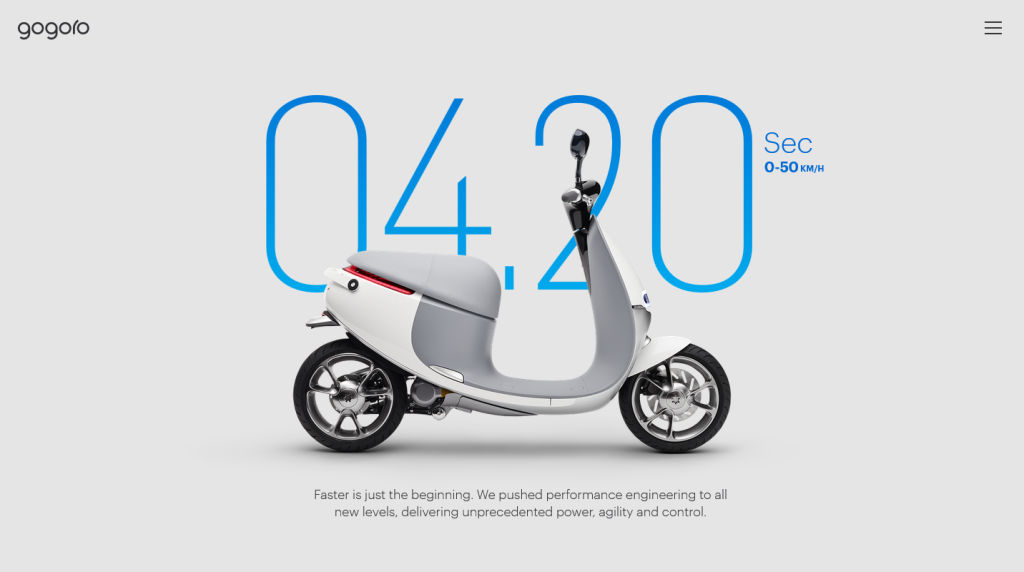
Author/Copyright holder: Gogoro. Copyright terms and licence: Fair Use.

Designers may find themselves under pressure from clients to use up whitespace. The client wants the most “content for their cash” and will heap ideas onto the design in order to get that perceived value for money. To them, “the more, the merrier”, or they might see the design surface as a “lifeboat” for their messages.

As much as they might think you ruthless, it’s worth pointing out to your clients that horror vacui is, in most cases, a bad idea. Tell them the truth — that the public have come to the conclusion that there is a relationship between high levels of whitespace and product quality. Products marketed with large amounts of whitespace often command a significant market premium. The designer’s job is to create return on investment for their clients; a frank discussion about perceptions of whitespace can often help the client justify backing down on their demands for “horror vacui” in your designs.

However, it’s worth remembering that horror vacui in design is not always a bad thing. Businesses with a sales strategy based on low prices, discounts, volume shifting, etc. (such as Walmart or your local dollar store for example) may actually be better served by busy designs. If you are trying to convey affordability rather than luxury,then you may need to cut down on the whitespace that you deliver in your designs.

Using other Tools to Manage Horror Vacui

Although we have the ultimate tool for combating horror vacui in design — whitespace — we can take advantage of other considerations.

  • Hick’s Law The time it takes your user to make a decision depends on the number of options you provide. Narrow down the essential options that are relevant to your design goal, accentuate them on your main page, and relegate non-essential ones to other pages via link buttons.

  • Control — This involves knowing your users. Ask yourself, who are they and what do they want from your design. Is your website appealing to people of a certain skill set or industry background?

  • Flexibility-Usability Tradeoff— Hit a good balance between flexibility and usability. Remember, the more you adapt your design to make sure that more users can access it effectively, the size of your design will increase, potentially overwhelming users with options. Making one size fit all can be counterproductive; think out ways of tailoring it to be more streamlined.

  • Performance Load — Don’t give your users ‘work’. This means stepping back as designers and appreciating what our users have to do to use our design. Don’t make a pleasurable user experience anything like completing a tax form.

  • Signal-to-Noise Ratio — Unnecessary elements in a design create noise, jarring the user’s senses while detracting from the effectiveness of the essential elements. Do you really need those jazzy stars around your design’s “star feature”?

  • Occam’s Razor Choose the simple over the complex; do not multiply elements unless absolutely necessary. The eye strains at the complex.

  • 80/20 Rule Pareto’s Principle, which states that 80% of users only use 20% of a product’s given features. Focus on what are vital elements; leave the non-essential or nice-to-know ones out.

  • Progressive Disclosure Lead your users through the actions you want them to take in gradual steps. By gently increasing the detail on subsequent screens, you will avoid drowning them in information.

  • Direct Manipulation — Using this means that we present our design to our user in much the same way as we might provide a steering wheel for a car. The user can interact with visible objects through visible actions in a transparent interface.

  • Chunking — Be direct and concise with the content you’re showing. Can you divide it up into smaller pieces of information? Users will be able to digest these far more easily than a single “chunk” made up of many parts.

The Take Away

Horror vacui is the fear of emptiness. An age-old concept, evidence of this fear is visible throughout history, in busy, element-saturated work of past masters of the brush and canvas. The compulsion to populate a design with as many elements as it could hold appeared in interior design, too. Rich, labor-intensive detail once dominated design surfaces.

Finally, one critic identified the problem in regard to Victorian interior design. Horror vacui became a term used to chide interior designers who had taken it upon themselves to drown their designs with elements. Overloaded, busy designs distract, confuse, confound, and even upset users.

“Less is more” would grow to become an anthem or catchphrase in modern design. Minimalism in the marketplace denotes classiness and style, as seen in high-quality magazines with low image density, as opposed to the high-image density flyers we receive as junk mail. Our eyes tend to tell us that the value of a lone item in an image is greater than a hundred clustered ones.

As web designers, we have a powerful weapon in our arsenal against horror vacui. We can make our designs more accessible, more user-friendly, and more valuable by using whitespace. Whitespace enables us to set off our element against a calming background, boosting the worth of the element in the process.

We can use whitespace in conjunction with a number of other concepts, ranging from Hick’s Law and Occam’s Razor, to Progressive Disclosure and Chunking. Ultimately, we need to serve our users best by knowing what they want in our design. We also need to assess whitespace (also known as negative space) as being a huge positive force. It will spotlight the standout, selling elements, helping us to reach our goal — a good user experience.

References & Where to Learn More

Lima, M. (2014). “Horror Vacui and the battle for white space”. Code Academy.

Marcantonio, B (2015). “Design Principles – Gestalt, white space and perception”. Design and UX.

Newbold, C. (2015). “Design Principle: Horror Vacui (or, a far of white space)”. The Visual Communication Guy.

Steffen, N. (2015). “Whitespace or Dead Space: Beware the Horror Vacui of Web Design”. The Blog.

Hero Image: Author/Copyright holder: Lionel Allorge. Copyright terms and licence: CC BY-SA 3.0

Feel Stuck?
Want Better Job Options?

AI is replacing jobs everywhere, yet design jobs are booming with a projected 45% job growth. With design skills, you can create products and services people love. More love means more impact and greater salary potential.

At IxDF, we help you from your first course to your next job, all in one place.

See How Design Skills Turn Into Job Options
Privacy Settings
By using this site, you accept our Cookie Policy and Terms of Use.
Customize
Accept all

Be the One Who Inspires

People remember who shares great ideas.

Share on:

Academic Credibility — On Autopilot

Don't waste time googling citation formats. Just copy, paste and look legit in seconds.