Affordances

Your constantly-updated definition of Affordances and collection of videos and articles.
Be a conversation starter: Share this page and inspire others!

394 Shares

What are Affordances?

Affordances are the characteristics or properties of an object that suggest how it can be used. It shows a user that an object can be interacted with.

As such, an affordance is not a “property” of an object (like a physical object or a User Interface). Instead, an affordance is defined in the relation between the user and the object: A door affords opening if you can reach the handle. For a toddler, the door does not afford opening if she cannot reach the handle.

An affordance is, in essence, an action possibility in the relation between user and an object.

Sounds complex? Good news, we made a few videos for you with some examples to make it easy for you to understand.

Learn what affordances are through examples and see why affordances are key to users’ desired actions.

Transcript

“When affordances are taken advantage of, the user knows what to do just by looking: no picture, label, or instruction needed.”

Don Norman, Grand Old Man of User Experience

Affordances are Everywhere

Psychologist James Gibson coined “affordance” in 1977, referring to all action possibilities with an object based on users’ physical capabilities. For instance, a chair affords sitting on, standing on, throwing, etc.

Don Norman later (1988) introduced the term to the design community modified the meaning slightly to make it more appropriate for use by designers. For example, Don Norman defined affordances as perceivable action possibilities – i.e., only actions which users consider possible. So, designers must create objects’ affordances to conform to users’ needs based on these users’ physical and perceptual capabilities, goals and past experiences. Clear affordances are vital to usability. Users will map the possibilities of what an object does according to their conceptual model of what that object should do (e.g., inserting fingers into scissor holes to cut things).

Signifiers and affordances

Don Norman also introduced the term “signifier”, which is elaborated greatly in his 2013 edition of The Design of Everyday Things.

Learn about signifiers and the critical role they play in design.

Transcript

A "signifier" is some sort of perceivable cue about the affordance. Don Norman introduced the term to make a clear distinction between the signal an affordance might provide to a person, which is entirely in the perceptible part of an affordance, and the actual affordance itself. Signifiers can exist on their own. Just as affordances can exist without any signifier - the signifier part of an affordance may be invisible (or misleading).

Explore how you can make invisible affordances visible.

Transcript

The reason Don Norman introduced the term “signifier” was that many people were misusing the concept of affordance after it had been introduced to the design community in the 1988 edition of The Design of Everyday Things. By introducing the distinction between signifier and affordance into two more distinct components, it became clear that much of design has nothing to do with affordances, but with signifiers.

Learn more about the differences between affordances, perceived affordances and signifiers.

Transcript

For example, a painted zebra stripe in the side of a road is a signifier, a signal about where to walk. It is telling you where it is safe to walk. However, you can walk anywhere on the road - there are no affordances stopping you. A fence by the side of the road would stop you since it has a physical affordance. Unless you are able to climb over the fence, of course.

More elaborations on affordances

In 1991, William Gaver, another notable designer, defined three types of affordances:

  • Perceptible – Perceptual characteristics of the object itself indicate what action possibilities are available and desired – e.g., a door handle. These obvious properties prompt users to use the affordance in an intended way.

  • Hidden – In user interfaces without obvious affordances, users often must rely on experience and/or trial and error to determine possible actions – e.g., they hover/click on suspected drop-down menus.

  • False – An object’s characteristics suggest users can do something they can’t – e.g., underlined text that isn’t a link.

In 2001, Human-computer interaction (HCI) expert Rex Hartson defined four additional types:

  • Physical – The perceptual characteristics show users what to do – e.g., a large, highly visible “Add to cart” button. (Whenever text appears on affordances such as buttons, they’re called explicit affordances.)

  • Cognitive –Design features that help users notice or know about things – e.g., clearly labelled text to announce what will happen if users press a certain key.

  • Sensory – Design features that help users sense something – e.g., clear “pinging” feedback to indicate an available update.

  • Functional – Design features that help users achieve goals – e.g., an item appears in a shopping cart after a user clicks “Add to cart”.

In user interface (UI) design, other main affordances include:

  • Pattern – You follow conventions to prompt users to take actions – e.g., hamburger icons indicate menus.

  • Negative – You block users from proceeding towards a goal when they must provide more data – e.g., a greyed-out “Create account” button remains until users complete the form.

The Interaction Design Foundation homepage is loaded with affordances – e.g., the shadows and the shape make the blue rectangles stand out as buttons.

How to Design the Best Affordances

You want to minimize or prevent user errors and cognitive friction. User errors occur when users fail to map between the actions they perceive they can take with an object and the actions it allows. Cognitive friction results from unexpected system actions after a user attempts a task. So, correct clues and immediate, effective feedback are essential. You should:

  1. Understand your users best through UX research – especially how they’ll anticipate affordances in the unique settings/context of encountering your design. Leverage these insights to provide the best clues to users, who will expect to find obvious cues to perform tasks.

  2. Use design principles to create logically arranged, clear affordances without clutter – so users can intuit what functions of your graphic user interface (GUI) each affordance controls.

  3. Use signifiers to direct users to affordances – Wherever you can’t make affordances obvious due to color constraints, etc., mark the affordance (e.g., highlight, shadow) or write text on or near it to guide users as to what they should do.

  4. Follow conventions so users recognize affordances – E.g., “Search” in search boxes.

  5. Apply Fitts’ Law to help guide users’ judgments and actions – Since this law establishes that users make more mistakes when moving quickly at smaller targets that are farther apart, help users by (e.g.) making large command buttons to show them priorities.

  6. Exploit Material Design – With Google’s Android-oriented design language, you can leverage cue-rich features and natural motions to support onscreen touch experiences. Customize icons to meet users’ expectations best as you present your brand.

If designing for augmented reality or virtual reality, you have the advantage of reflecting real-world behaviors and physics in your affordances. In any case, the fine details—including a thoughtful application of color theory—can help give users the conceptual model and hints they need. When users know what to do without having to explore your product, they’ll get tasks done faster and make far fewer mistakes.
Questions About Affordances?
We've Got Answers!

What are affordances in psychology?

Affordances in psychology refer to the potential actions individuals perceive when interacting with objects in their environment. They highlight how design features can suggest their intended function to users. For instance, a flat surface may afford sitting, while a button might afford pushing. The term has been pivotal in Human-Computer Interaction, especially when designing intuitive user interfaces. For an in-depth understanding, refer to the book chapter on Affordances in The Glossary of Human-Computer Interaction at Interaction Design Foundation.

What is an example of an affordance?

An example of an affordance is a ladder. To a grown-up, a ladder affords climbing due to its rungs and height, suggesting its primary function. However, for a baby, the same ladder does not present the same affordance because the baby lacks the capability to climb it safely. This highlights that affordances are relational, depending on both the object and the user. For a visual illustration of this example, watch our video on affordances where we delve into the ladder's varying affordance for different users.

For more on how to use affordances in design, take this advanced course on the Interaction Design Foundation, Affordances: Designing Intuitive User Interfaces.

What are the 4 types of affordances?

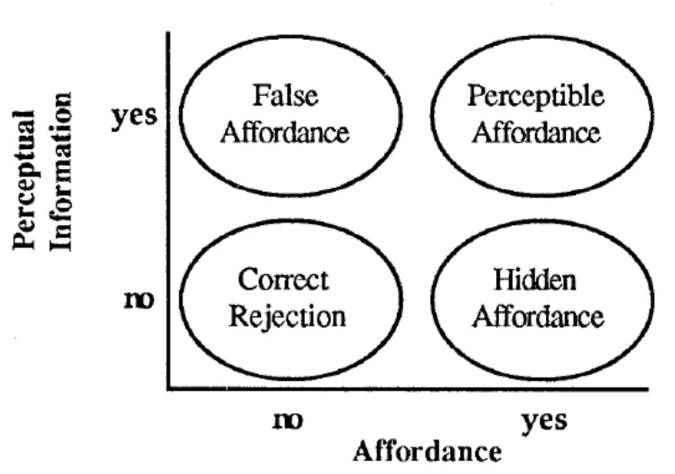
Industry professionals have identified different types of affordances based on differing criteria. Here is William Gaver’s systematic analysis of affordances in the context of HCI. He identifies four combinations of the presence or absence of affordances, on the one hand, and the presence or absence of information about affordances, on the other hand: perceptible affordances, false affordances, hidden affordances, and correct rejection.

Separating affordances from the information available about them allows the distinction among correct rejections and perceived, hidden and false affordances. From Gaver (1991).

© William Gaver, All Rights Reserved. Reproduced with permission.

  1. Perceptible Affordance: These are clear and visible objects' properties that suggest how somebody should use them. For instance, a door handle offers pulling or pushing.

  2. Hidden Affordance: While the object can be used a certain way, this function is only sometimes obvious. For example, touch gestures on modern smartphones might be rare.

  3. False Affordance: This is when an object appears to be used in a particular way, but in reality, it cannot. An example would be a button that doesn't press.

  4. Correct Rejection: This denotes situations where it neither looks nor acts as though it has a particular function.

For more examples and a comprehensive understanding of affordances, refer to this video.

Transcript

Is affordance good or bad?

Affordance, as detailed in our video on Norman doors, isn't intrinsically good or bad.

Transcript

It represents the possible actions an object can offer to a user. An affordance's effectiveness hinges on context and design intentions. A correctly implemented affordance naturally guides users, improving usability. Conversely, a misleading affordance can confuse. As the video highlights, Norman doors are classic examples of poor affordances, leading to user frustration. Designers must aim to make affordances evident, discoverable, and congruent with user expectations to ensure an optimal user experience.

Why do affordances matter?

Affordances, as elucidated in our video on signifiers, are pivotal for intuitive design.

Transcript

Affordances indicate the potential interactions between a user and an object. When clear, they facilitate a seamless user experience, reducing errors and frustrations. On the other hand, vague or incorrect affordances can mislead users, leading to confusion. Signifiers, discussed in the video, amplify the visibility of these affordances, guiding user actions more effectively. Understanding and leveraging affordances in design ensures products are user-friendly and intuitive.

What makes a good affordance?

A good affordance, as highlighted in our article on affordances and design, clearly communicates how an object should be used without ambiguity. It aligns with users' expectations and experiences, allowing for intuitive interactions. Appropriate signifiers often support practical affordances, making them easily discernible. They reduce the need for instructions and minimize user errors, ensuring a smooth and efficient user experience. A good affordance seamlessly bridges the gap between user intentions and design functionalities.

Learn how to affordances in design in the course, Affordances: Designing Intuitive User Interfaces.

What are affordances in communication?

Affordances in communication refer to the potential actions or interactions enabled by communication tools or mediums. Just as a door handle suggests pulling or turning, communication tools provide cues on how to share or receive information. For instance, a microphone's design indicates an amplifying voice, while an email's 'reply' button suggests a direct response. Understanding affordances in communication tools ensures clarity, reduces miscommunication, and enhances effective information exchange.

What is an example of a social affordance?

A social affordance guides interactions within a social context. For instance, a 'like' button on social media platforms offers an immediate, non-verbal way to express approval or support. This simple feature enables users to engage, show appreciation, or align with particular views, fostering community bonding and interaction. Such features capitalize on human social behaviors, making digital interactions more intuitive and meaningful.

Where to learn more about affordances?

To dive deeper into affordances and their impact on intuitive design, consider enrolling in our course Affordances: Designing Intuitive User Interfaces. This comprehensive course explores the nuances of affordances, ensuring designers create user-friendly interfaces. It's the ideal resource for those eager to master the art of leveraging affordances in design.

Earn a Gift Earn a Gift, Answer a Short Quiz!

1
2
3
4
1
2
3
4
Question 1
Question 2
Question 3
Get Your Gift
Interaction Design Foundation logo

Question 1

What does the concept of affordance primarily describe in user interface design?

1 point towards your gift

  • The aesthetic value of an interface
  • The potential actions that an object facilitates
  • The durability of digital products
Interaction Design Foundation logo

Question 2

Which type of affordance is immediately apparent to users through visual cues?

1 point towards your gift

  • False affordance
  • Hidden affordance
  • Perceptible affordance
Interaction Design Foundation logo

Question 3

What is a key design goal for affordances in user interfaces?

1 point towards your gift

  • To lower the use of complex features and cognitive bias
  • To minimize user errors and cognitive friction
  • To reduce the visibility of essential features

Learn More About Affordances

Make learning as easy as watching Netflix: Learn more about Affordances by taking the online IxDF Course Affordances: Designing Intuitive User Interfaces.

Why? Because design skills make you valuable. In any job. Any industry.

In This Course, You'll

  • Get excited when you use affordances to design intuitive user interfaces that help people achieve their goals effortlessly. Affordances are one of the key secrets behind products that are easy and intuitive to use. You'll empower people by making their lives easier, safer, and more enjoyable. If your designs frustrate people, you'll likely lose them. From websites to everyday objects, affordances instantly clarify how people should use products. In physical products, a handle says, "grab me." In tech, affordances guide interactions through recognizable elements like buttons that look clickable or a scissor icon that clearly means "cut" selected content. When people know what to do without thinking, they'll love your interface and keep coming back.

  • Make yourself invaluable with a deep understanding of how affordances make products feel effortless. An intuitive User Interface (UI) isn't just user-friendly; it's business-friendly. Studies show that when people feel confident using your product, they're more likely to choose it over competitors. People will make fewer mistakes when they naturally understand what to do. In industries like healthcare, transportation, or construction, good affordance design can even save lives.

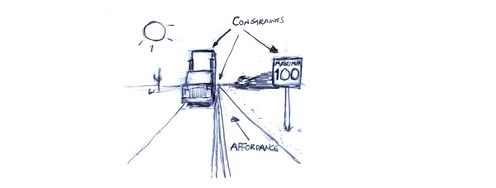
  • Gain confidence and credibility as you use affordances to create products people love and recommend. You already understand affordances intuitively, like knowing that a door with a push plate opens inward. Your existing skills, combined with step-by-step guidance, make mastering affordances easy, regardless of your background. Clear affordances build trust in your design. You'll tap into familiar patterns and reduce cognitive load with proven frameworks that ethically influence behavior. You'll apply concepts such as visibility, findability, constraints, mapping, feedback, and conceptual models. Affordances are grounded in timeless human behaviors. These timeless human-centered design skills keep you in demand and ensure your interfaces work for people, whether you're sketching, prototyping, or working with AI.

Get an Industry-Recognized IxDF Course Certificate

Increase your credibility, salary potential and job opportunities by showing credible evidence of your skills.

IxDF Course Certificates set the industry gold standard. Add them to your LinkedIn profile, resumé, and job applications.

Course Certificate Example

Be in distinguished company, alongside industry leaders who train their teams with the IxDF and trust IxDF Course Certificates.

Our clients: IBM, HP, Adobe, GE, Accenture, Allianz, Phillips, Deezer, Capgemin, Mcafee, SAP, Telenor, Cigna, British Parliament, State of New York

All Free IxDF Articles on Affordances

Read full article
Affordances and Design - Article hero image
Interaction Design Foundation logo

Affordances and Design

'Affordance' is a term most designers will have come across at some stage of their studies and careers. Don Norman introduced this term to the design community.Despite Don Norman’s best efforts, the underlying meaning of the term is sometimes misunderstood.How to define 'Affordance'Don Norman first

Social shares
811
Published
Read Article
Read full article
Master Mobile UI Design: Delight Your Users - Article hero image
Interaction Design Foundation logo

Master Mobile UI Design: Delight Your Users

Mobile devices contribute to over 60% of online traffic—and it’s a fact that shows the need to provide superior user experiences on mobile devices. A great mobile UI (User Interface) design is crucial to web design and a website's success. It takes a strong grasp of how to apply visual elements that

Social shares
594
Published
Read Article

Affordances and Design

Affordances and Design

'Affordance' is a term most designers will have come across at some stage of their studies and careers. Don Norman introduced this term to the design community.

Despite Don Norman’s best efforts, the underlying meaning of the term is sometimes misunderstood.

How to define 'Affordance'

Don Norman first mentioned affordances in the context of design in The Design of Everyday Things (1988). Norman borrowed the term and concept from the world of James J. Gibson (1977; 1979), a prominent perceptual psychologist, but modified the meaning slightly to make it more appropriate for use by designers. Gibson originally used the term to describe "...the actionable properties between the world and an actor [user]" (Norman, Affordances and Design).

Gibson's definition essentially identifies the powerful relationship between man and things. Whether through experience or some innate ability (we will leave this debate for another day), we are capable of assessing objects according to their perceptible properties. These interpretations allow us to both determine an object's possible uses and analyse how they might help us achieve our aims and objectives. For example, just by looking at a glass we can determine that the object affords holding liquid, so we can quench our thirst. Some affordances are less obvious, and many yet to be realised, but with objects in the real, physical world, there is a natural and direct relationship between the perceptible qualities of tangible things and what we can do with them.

The Evolution of "Affordances"

In design, we cannot rely on this natural relationship. Aside from touchscreens, interactive elements in screen-based interfaces have affordances that exist in the virtual world alone, and the means of interaction are almost exclusive to this domain. Norman referred to the affordances found in screen-based interfaces as 'perceived', on the grounds that users form and develop notions of what they can do according to conventions, constraints, and visual, auditory, and sometimes haptic feedback.

Norman's distinction between real and perceived affordances is an important one for designers, especially those involved in the development of graphical user interfaces. While we have tacit knowledge of how the perceptible characteristics of physical objects will be interpreted, the design of graphical elements requires an understanding of what the user assumes or perceives will occur as a result of their interaction(s).

Perceived Affordances in Graphical User Interfaces


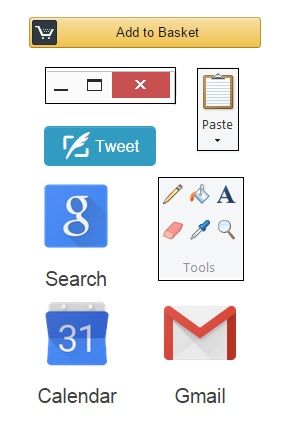
Author/Copyright holder: Z.Evelyn. Copyright terms and license: All rights reserved Img source

For experienced users, interacting with screen-based interfaces is an activity often taken for granted. You know where and when to click at each stage of a task, that desktop icons must be double-clicked to open the contents, red squares with an embedded white cross signify that clicking will close the window, panel, or page, and that right clicking on the screen (at most points) will usually reveal a sub-set of options, such as 'back', 'reload', 'save as...', and 'print' on a webpage. In contrast to the real affordances found in the physical world, these are learned conventions that are revealed or signified by established, consistent, but artificial, cues.

At most points during human-computer interaction, users are able to move a cursor - or pointer of some sort - to click on all parts of the screen and tap the keys on their keyboard, but whether these actions are meaningful or have any effect on the screen, system, or software is dependent on what has been programmed. The designer must, therefore, provide explicit cues (and as the user becomes more experienced and proficient, implicit cues) that help the user determine what effect(s) their interactions will have, when to carry out specific actions, and to help them establish whether these actions have been successful/unsuccessful.

Identifying Real and Perceived Affordances

Our ability to identify affordances in the real-world is constrained almost solely by our current drives and motivations (or our imagination). For example, when asked to identify the affordances of a kitchen towel we might think of the primary uses, such as drying, wiping, and for heat-protection when taking something hot from the oven. However, in a different situation, we would be capable of finding alternative uses for the kitchen towel, such as using it to put out a pan fire, or to prevent a chopping board from sliding.

In contrast, graphical objects and interactive elements are much less flexible; we can usually left/right click, double-click, hold down a button and drag, or use the keyboard, but the actual results of these actions are constrained by the interface. For this reason, users' actions are based on predictions, which are only confirmed once the action has been carried out.

Perceived Affordances and Consistency

If users are to instantly identify the interactive elements on a screen, and accurately predict the results of their interactions, the interface must work according to their expectations. These expectations are based on prior experience with other products. By conforming to the design traditions, such as those mentioned above, the user is able to apply knowledge from one interface to another. Conversely, inconsistencies will more than likely lead to inaccurate predictions and errors as a direct result.

Consistency across different interfaces is important, but if you are dealing with new or innovative products, you may introduce new or unfamiliar actions. When this is the case, consistency is still essential, as the user must be able to apply their understanding of the perceived affordances from one situation to another within the same product. For example, consider a computer game where the player can pick up a number of different objects; if there were a different action or set of button presses for each specific object there is far greater potential for user error, as there are multiple methods of interaction to achieve the same result in the game (i.e. picking something up).

Affordances and Modern Technology


Traditionally, perceived affordances are based on domain-specific conventions and consistency, but in the last ten to twenty years, and especially with the evolution of touchscreens, designers have been taking inspiration from real affordances to allow the application of knowledge from the real-world to the virtual world. Users are now able to touch (e.g. Apple products), shake (e.g. Nintendo Wii controllers), blow (e.g. the Nintendo DS), swipe (e.g. e-Readers), and rotate (e.g. computer controllers) objects to influence events in the virtual world in a way that match the corresponding activities in the real-world.

The use of real-world affordances as inspiration in the design of products in human-computer interaction may present the possibility of a smooth passage from the physical to the virtual world. However, it also has the potential to influence the user negatively; especially, if the required behaviours are similar but the resulting events are unpredictable, or the necessary actions inaccurately reflect those activities we would carry out in the physical world.

Whichever approach designers adopt, their users must be able to develop an accurate view of the interface, so they can instantly and unconsciously predict the effect(s) of their actions to achieve as stable and predictable a relationship as that found between man and things in the real-world.

References & Where to Learn More

Header Image: Author/Copyright holder: Dorian Taylor. Copyright terms and licence: All rights reserved. Img

Course: Affordances: Designing Intuitive User Interfaces

Feel Stuck?
Want Better Job Options?

AI is replacing jobs everywhere, yet design jobs are booming with a projected 45% job growth. With design skills, you can create products and services people love. More love means more impact and greater salary potential.

At IxDF, we help you from your first course to your next job, all in one place.

See How Design Skills Turn Into Job Options
Privacy Settings
By using this site, you accept our Cookie Policy and Terms of Use.
Customize
Accept all

Be the One Who Inspires

People remember who shares great ideas.

Share on:

Academic Credibility — On Autopilot

Don't waste time googling citation formats. Just copy, paste and look legit in seconds.