How to Transform Mental Models into Conceptual Models for Mobile UX

• 7 min read

824 Shares

Conceptual models are used in HCI and interaction design as a way for designers to communicate how they interpret users' mental models to stakeholders, team members, and developers. They help ensure that everyone involved in the design process understands how users interact with the product or service. Here, we will go through the process of reframing mental models to conceptual models and how they help your design process.

A conceptual model visually represents how a designer understands users' mental models. To create a conceptual model, designers use information from user research, such as interviews, surveys, or observations. They then use this information to develop visual representations of how users perceive and interact with the system or product. These representations can take many forms, including flowcharts, diagrams, wireframes, or prototypes. The ability to quickly and easily sketch conceptual models can save significant amounts of time in UI design and help create more intuitive applications.

The following is an example of a poor conceptual model in the context of public bike rental. In the user's mental model, the first step is to unlock a bike, then sign up and add a credit card to start riding around the city. However, the app offers users a choice between a virtual key card and a physical key card, which conflicts with the user's goals since there is no indication of anything physical. This confusion can cause frustration and delay for users trying to rent a bike and get on with their journey quickly.

A conceptual model will respect previous experiences and augment the mental model without shocking users with a new metaphor that makes no sense.

© Frank Spillers, used with permission

How to Create an Effective Conceptual Model

In his work on conceptual models, Professor Jeff Johnson from the University of San Francisco highlights the following benefits:

  • Simplify the User Interface: Conceptual models make it easier for users to navigate and understand the interface by providing a clear and concise representation of how the application works. For example, a conceptual model can help users understand how different features of a word processor are related and how to use them to create a document.

  • Consistent Use of Terminology: This helps avoid confusion and makes it easier for users to understand how to perform specific tasks. For example, if a photo-editing app consistently uses the term "crop" to describe the process of trimming an image, users will quickly learn what this means and be able to use the app more effectively.

  • Describe Tasks and Goals: Conceptual models should describe tasks and goals without revealing the specific user interactions required to achieve them. For example, a conceptual model for an email client might describe the goal of "sending an email" without detailing the steps needed to compose, address, and send a message.

  • Support Development Processes: Conceptual models can be valuable tools for developers and users. By providing a clear understanding of how an application is intended to work, conceptual models can help developers identify potential problems or inconsistencies in their design.

  • Reduce Rework and Development Resources: Finally, by helping ensure that an application is well-designed and easy to use from the outset, conceptual models can help reduce the need for rework or additional development resources later on, which saves time and money for both developers and users.
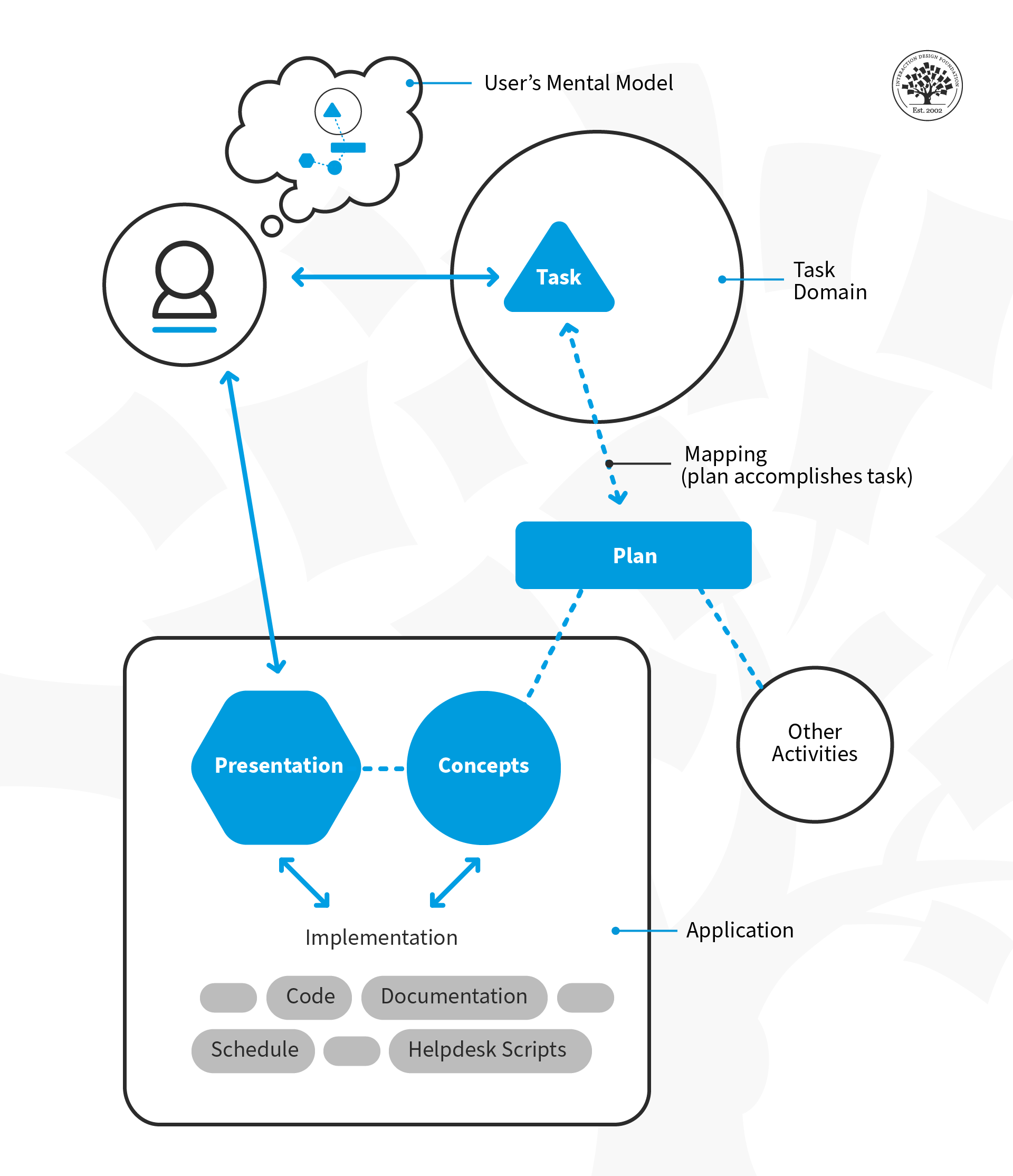
© Jeff Johnson, reproduced by Interaction Design Foundation, Fair Use

Steps to create conceptual models

  • Identify Tasks: Identify the tasks that your users need to accomplish. Use language that is familiar to them and avoid using technical jargon or unfamiliar concepts. For example, if you're creating a model for a recipe app, you might identify tasks such as "searching for recipes," "saving favorite recipes," and "creating a shopping list."

  • Identify Objects: Once you've identified the tasks, identify the physical objects or concepts that are relevant to those tasks. For example, in a recipe app, the objects might include ingredients, cooking utensils, and cooking methods.

  • Assign Actions and Attributes to Objects: Once you've identified the objects, assign actions and attributes to them based on how your users will interact with them. For example, in a recipe app, you might assign attributes such as cooking time, serving size, and nutritional information to each recipe.

  • Use Consistent Terminology: To avoid confusion, use consistent terminology throughout your product. For example, if you use the term "book an appointment" on one screen of your mobile app, don't rename it as "book a meeting" elsewhere.

To start creating your conceptual models, download our free template to guide you through the process!
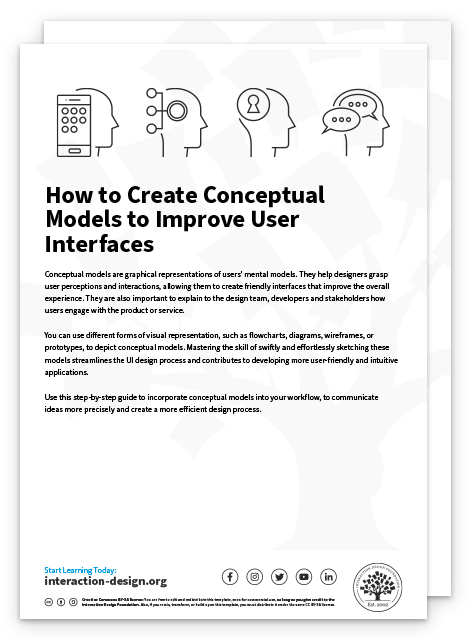
Advance Your Career With This Free Template for “How to Create Conceptual Models to Improve User Interfaces”
How to Create Conceptual Models to Improve User Interfaces
We respect your privacy
Get 1 powerful email each week: Design a life you love!

The Take Away

Conceptual models are a powerful tool for designers to understand and incorporate users' mental models into their designs. When designers create a structured representation of how users perceive and interact with a system or product, they can develop interfaces that align with their expectations, improving usability and user experience.

Conceptual models enable designers to stand in the users’ shoes and create intuitive and usable products. They also help the development team create use cases more efficiently and allow the UI design team to create interfaces that consider the users’ mental models. Conceptual models are an extension of task analysis and should be done during the early design phase to bring the most significant value to the project.

References and Where to Learn More

Dr. Susan Weinschenk reflects on mental and conceptual models and intuitive UX.

Abhijit Raweel, Principal Product Developer at Oracle shares his thoughts about conceptual models as a critical part of web application design.

Check out Hugh Dubberly's Google presentation on conceptual models.

Read Jeff Johnson and Austin Henderson’s work on conceptual models.

Check out Jeff Johnson’s Master Class webinar on Conceptual Models: A Guide to Intuitive Design.

Hero Image: © ux.folio.org, CC BY 2.0

Learn More in This Course:

AI for Designers

10 days
16 % booked
View Course

What You Should Read Next

  • Read full article
    10 Great Sites for UI Design Patterns - Article hero image
    Interaction Design Foundation logo

    10 Great Sites for UI Design Patterns

    You don’t want to spend your whole life redesigning the wheel, do you? No, neither do we. If you are looking for a design that solves a problem that has been solved with a different application before, then the template for your wheel is probably already out there. This lets you save time and make a

    Social shares
    1.4k
    Published
    Read Article
  • Read full article
    Shneiderman’s Eight Golden Rules Will Help You Design Better Interfaces - Article hero image
    Interaction Design Foundation logo

    Shneiderman’s Eight Golden Rules Will Help You Design Better Interfaces

    Follow Ben Shneiderman’s 'Eight Golden Rules of Interface Design' if you want to design great, productive and frustration-free user interfaces. Apple, Google and Microsoft are among some of the highly successful companies whose well-designed products reflect Shneiderman’s rules. The characteristics

    Social shares
    1.4k
    Published
    Read Article
  • Read full article
    User Interface Design Guidelines: 10 Rules of Thumb - Article hero image
    Interaction Design Foundation logo

    User Interface Design Guidelines: 10 Rules of Thumb

    Learn to design with your user’s needs and expectations in mind by applying Jakob Nielsen and Rolf Molich’s Ten User Interface Guidelines. These heuristics have been reflected in many of the products designed by some of the most successful companies in the world such as Apple, Google, and Adobe. Fur

    Social shares
    1.4k
    Published
    Read Article
  • Read full article
    Repetition, Pattern, and Rhythm - Article hero image
    Interaction Design Foundation logo

    Repetition, Pattern, and Rhythm

    Let’s look at three subjects that, at first glance, may strike you as being incredibly basic and self-explanatory. However, although they may seem like they should need no introduction, we should study them. By understanding these concepts, you’ll be able to apply them more effectively to captivate

    Social shares
    1.4k
    Published
    Read Article
  • Read full article
    The Grid System: Building a Solid Design Layout - Article hero image
    Interaction Design Foundation logo

    The Grid System: Building a Solid Design Layout

    Now that we’ve seen some grids at work in the Rule of Thirds article, let’s examine them a little more deeply. As a concept that deals so fundamentally with the fabric and background of our work as designers, it’s easy to overlook the power of grids and think more about the elements we want to creat

    Social shares
    1.4k
    Published
    Read Article
  • Read full article
    The Golden Ratio - Principles of form and layout - Article hero image
    Interaction Design Foundation logo

    The Golden Ratio - Principles of form and layout

    Now, we’re going to look at a subject that comes directly from mathematics and that we can also find all around us – the golden ratio. Don’t worry; we’re not going back into the classroom for long. We will examine what this concept is and exactly how much it is a fundamental part of making designs p

    Social shares
    1.3k
    Published
    Read Article
  • Read full article
    10 Free-to-Use Wireframing Tools for UX Designers in 2026 - Article hero image
    Interaction Design Foundation logo

    10 Free-to-Use Wireframing Tools for UX Designers in 2026

    Wireframes help you quickly ideate and test your ideas. While paper wireframes are the fastest to create, digital wireframes look more polished and presentable. If you are looking for a pocket-friendly wireframing tool, look no further.Whether you prefer browser-based apps or offline desktop tools,

    Social shares
    1.3k
    Published
    Read Article
  • Read full article
    Principle of Consistency and Standards in User Interface Design - Article hero image
    Interaction Design Foundation logo

    Principle of Consistency and Standards in User Interface Design

    Learn to design with consistency and standards in mind and understand the reasons why they’re important to incorporate them into your work. Derived from Jakob Nielsen and Rolf Molich’s Ten User Interface (UI) Guidelines, ‘Consistency and Standards’ are evident in many of the widely-used produc

    Social shares
    1.3k
    Published
    Read Article
  • Read full article
    Adaptive vs. Responsive Design - Article hero image
    Interaction Design Foundation logo

    Adaptive vs. Responsive Design

    The differences between responsive and adaptive design approaches spotlight important options for us as web and app designers. Choosing with insight can empower you to plan and execute your designs with better aim, purpose and results.With the pervasiveness and diversity of mobile devices, as design

    Social shares
    1.3k
    Published
    Read Article
  • Read full article
    Visual Hierarchy: Organizing content to follow natural eye movement patterns - Article hero image
    Interaction Design Foundation logo

    Visual Hierarchy: Organizing content to follow natural eye movement patterns

    Let’s look at a topic that deals with, oddly enough, how we look at designs. Once you understand how the human eye processes these, you’ll find yourself better able to arrange your elements more effectively.Content in any digital page layout will follow a specific hierarchy. Headers appear above bod

    Social shares
    1.3k
    Published
    Read Article

Top Articles

Top Topic Definitions

Feel Stuck?
Want Better Job Options?

AI is replacing jobs everywhere, yet design jobs are booming with a projected 45% job growth. With design skills, you can create products and services people love. More love means more impact and greater salary potential.

At IxDF, we help you from your first course to your next job, all in one place.

See How Design Skills Turn Into Job Options
Privacy Settings
By using this site, you accept our Cookie Policy and Terms of Use.
Customize
Accept all

Be the One Who Inspires

People remember who shares great ideas.

Share on:

Academic Credibility — On Autopilot

Don't waste time googling citation formats. Just copy, paste and look legit in seconds.

Feel Stuck? Want Freedom?

Get one powerful email each week, like 326,226 others.

Learn to design a life you love.

Next email in
6
days
20
hrs
4
mins
26
secs