Person using the search bar on their phone.

How to Design for Mobile Search

• 10 min read

695 Shares

Search functions are the foremost tool to navigate applications and the internet. The mobile user experience relies just as much on effective search patterns as the desktop. Here we explore eight mobile search patterns to help you design easily navigable experiences.

With the efficiency of modern search engines, led by Google, the search pattern has become the top way to get around the internet. That means mobile applications also need to take advantage of the search functionality to deliver user experiences of a sufficient standard.

The Eight Patterns of Mobile Search

The good news is that search is a well-understood area of functionality. Here we look at eight common patterns you can apply to mobile search. You can use them individually or with each other for maximum effect:

  • Auto-Complete

  • Explicit Search

  • Dynamic Search

  • Scoped Search

  • Faceted Search

  • Saved and Recent

  • Search Forms

  • Search Results

Auto-Complete

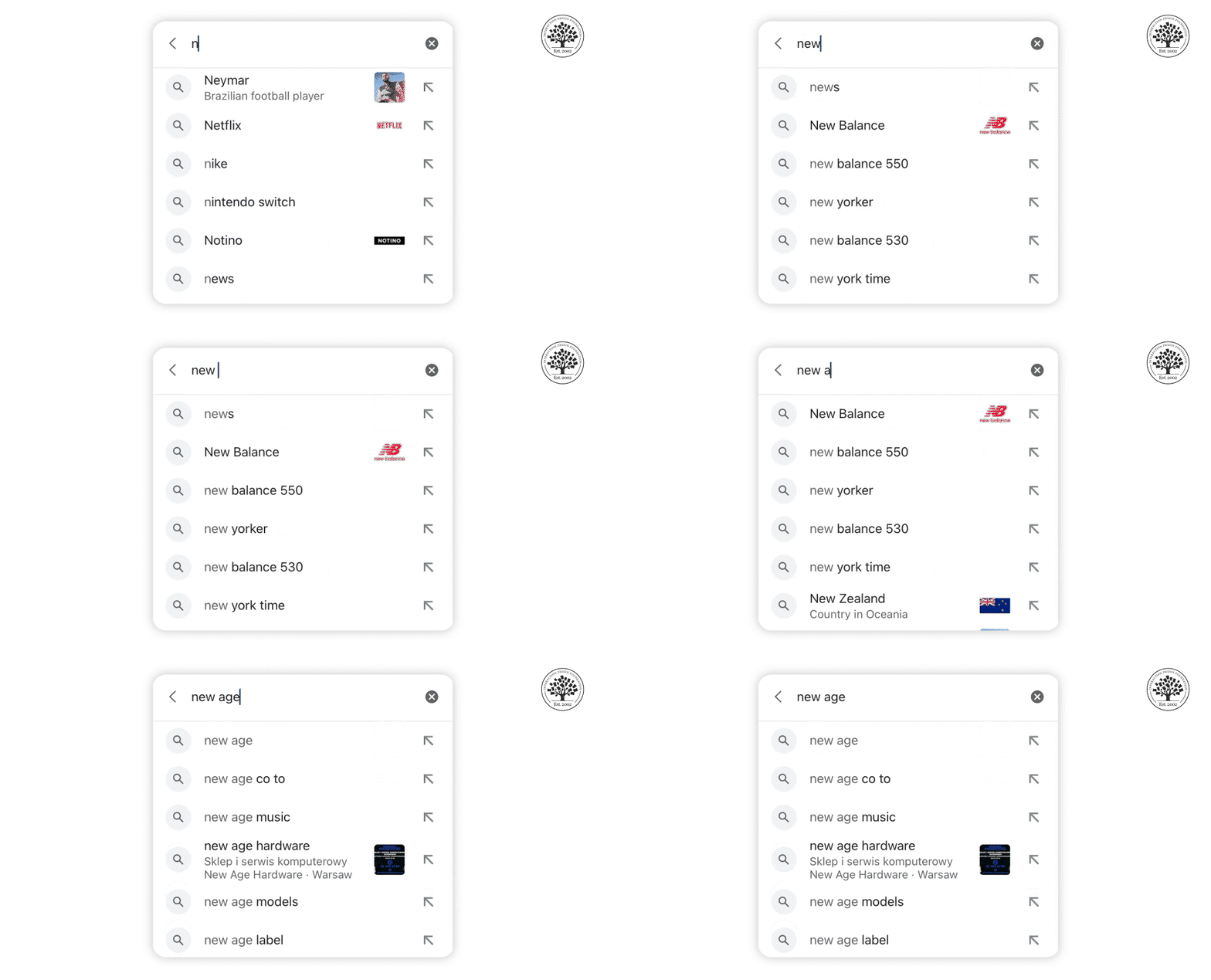
The Google Search app for iOS utilizes auto-complete to provide a convenient way to search the web quickly and easily.

© Google App on iOS, Fair Use

Auto-complete is often used with explicit search; it’s the idea that when a user begins to type a word, the software looks to complete it for them. This is particularly important on the mobile platform, where typing is a matter of thumb presses rather than using a keyboard.

Explicit Search

In explicit search, the user must complete an action to start the search process, such as tap a button on the display or use a keyboard control. Results from the search typically appear directly below the search bar.

You can use explicit search with auto-complete for better UX on mobile devices.

Dynamic Search
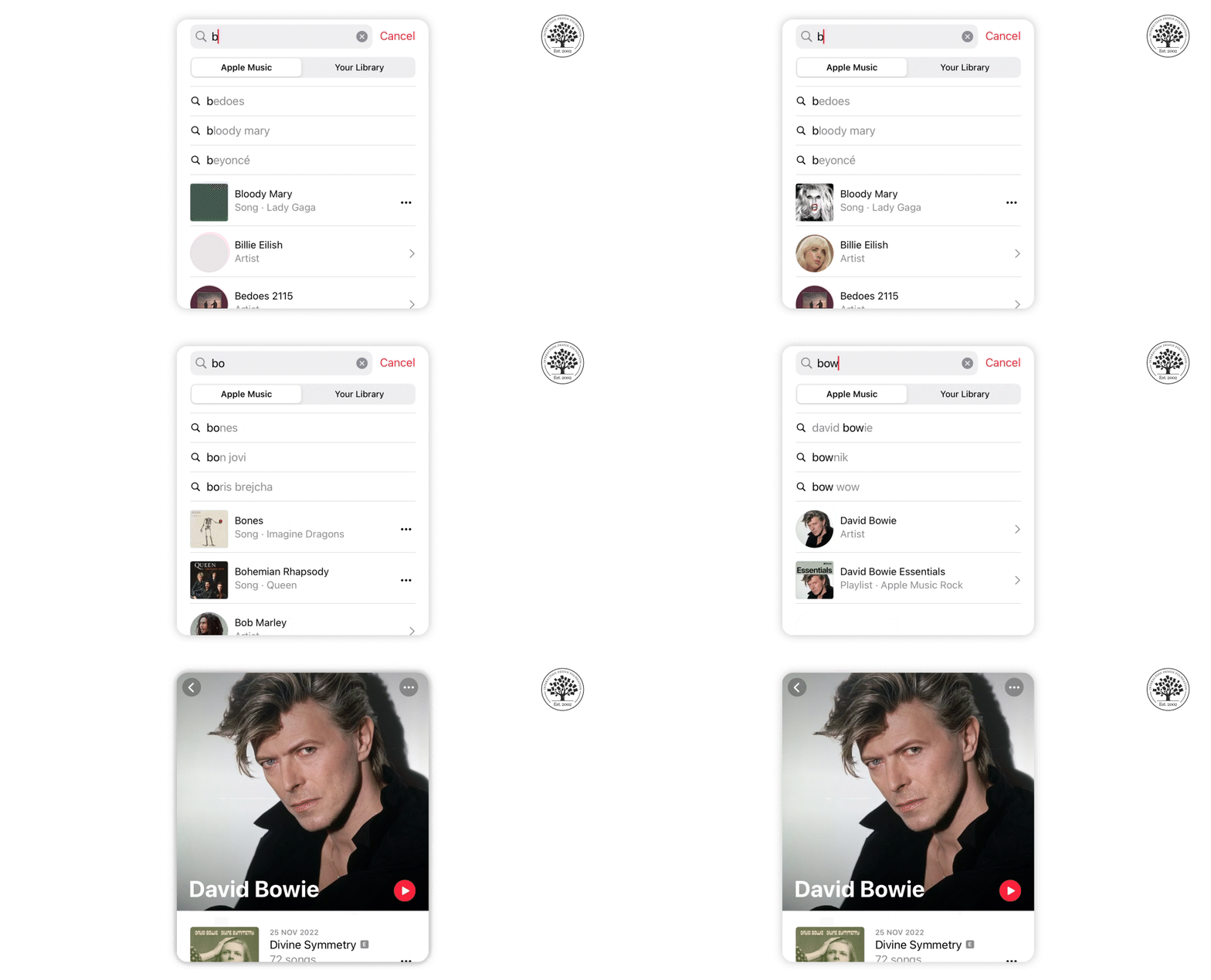
Apple Music uses dynamic search to help users easily find their favorite songs and artists by typing just a few keywords.

© Apple Music, Fair Use

Dynamic search uses a form of filter, so that when a user enters data, the content already on the screen changes in real-time. This can be very useful when a user has to wade through large volumes of data, for example, a list of hotels in a particular area.

Scoped Search
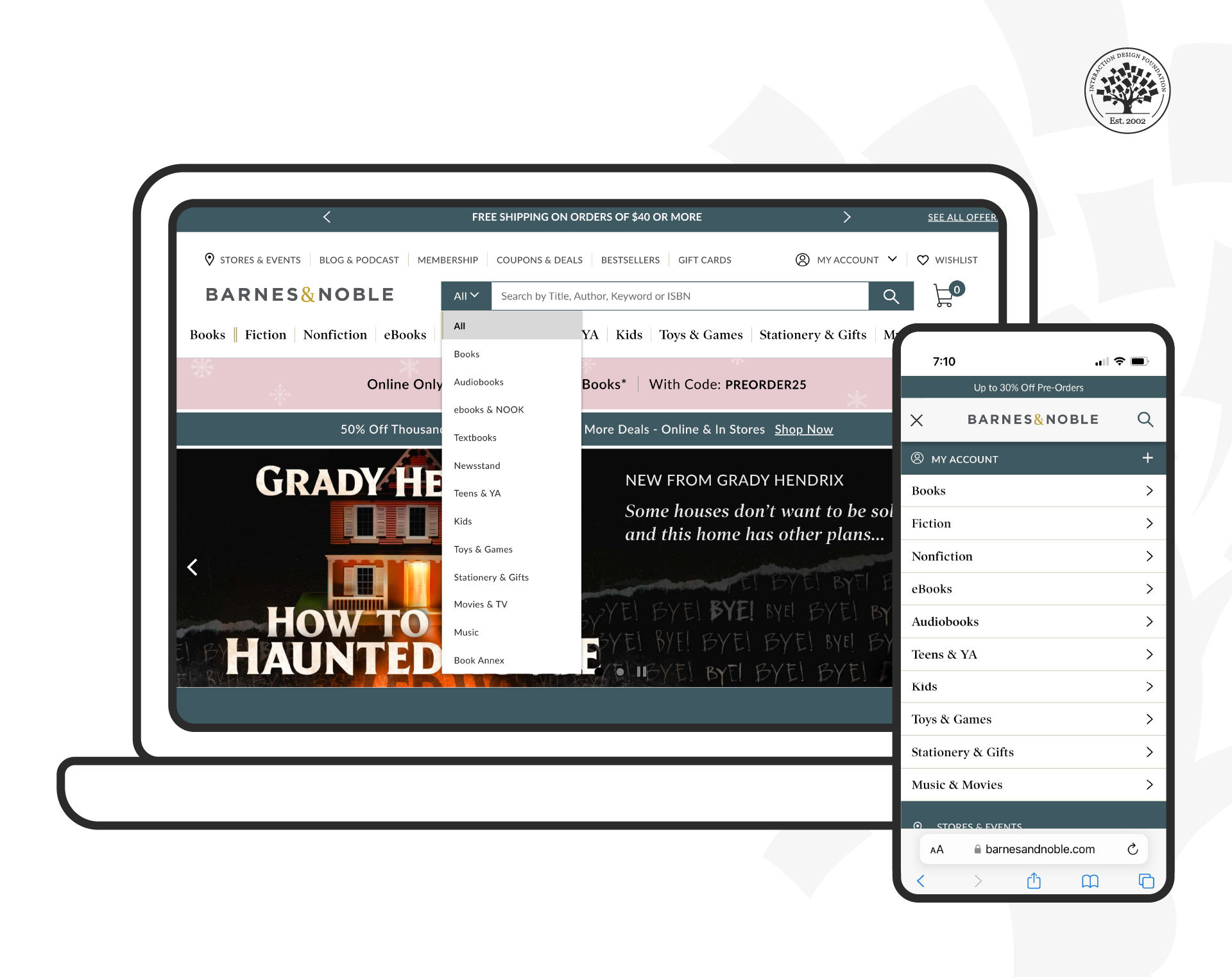
The Barnes and Noble website is not only mobile-friendly, but it also uses scoped search to help users find what they need more efficiently.

© Barnes and Noble, Fair Use

A scoped search allows the user to limit their search's realms to a particular website area. For example, the Barnes and Noble website allows users to choose between book categories before they enter the data.

Remember the limited screen real estate on mobile and try to keep the number of filters to a minimum while delivering value.

Faceted Search

Faceted Search is a more complex version of scoped (or filtered) search. Facets and filters differ in that filters omit results based on the initial criteria and do not change with every subsequent search, as opposed to facets, which are more specific and change with every new search. This pattern tries to deliver many search-filtering criteria and allows the user to tweak multiple filters to narrow down substantial data sets. Designers implement faceted search in a tray pattern that enables users to set filters.
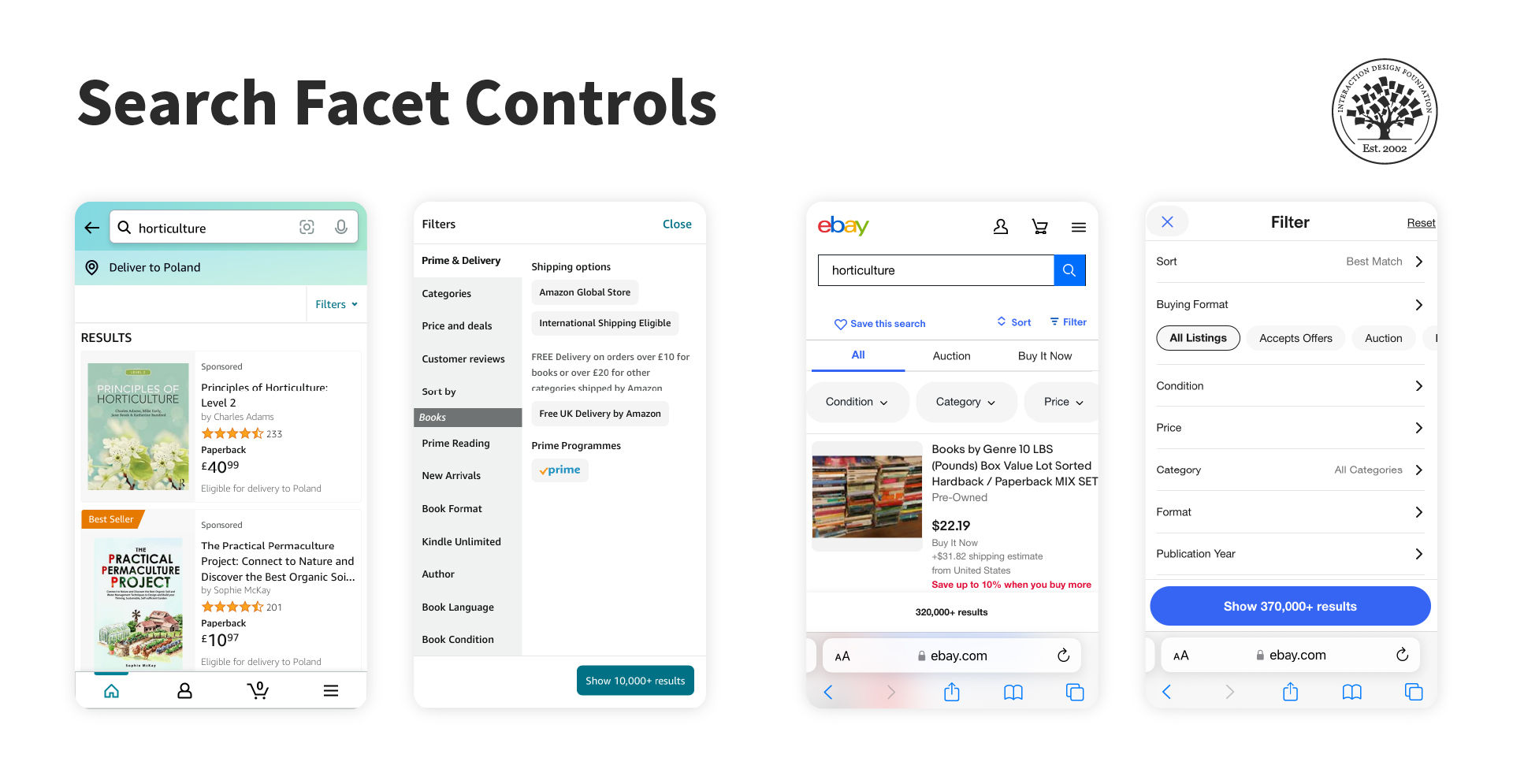
Amazon’s iPhone application (left) and eBay’s mobile website (right) display search facet controls on the same screen as the search results.

© Amazon, eBay, Fair Use

Saved and Recent

This search pattern recognizes that users often want to return to a search that they have used in the past. It allows the user to save their searches (or does this automatically on behalf of the user) and then recall them later.
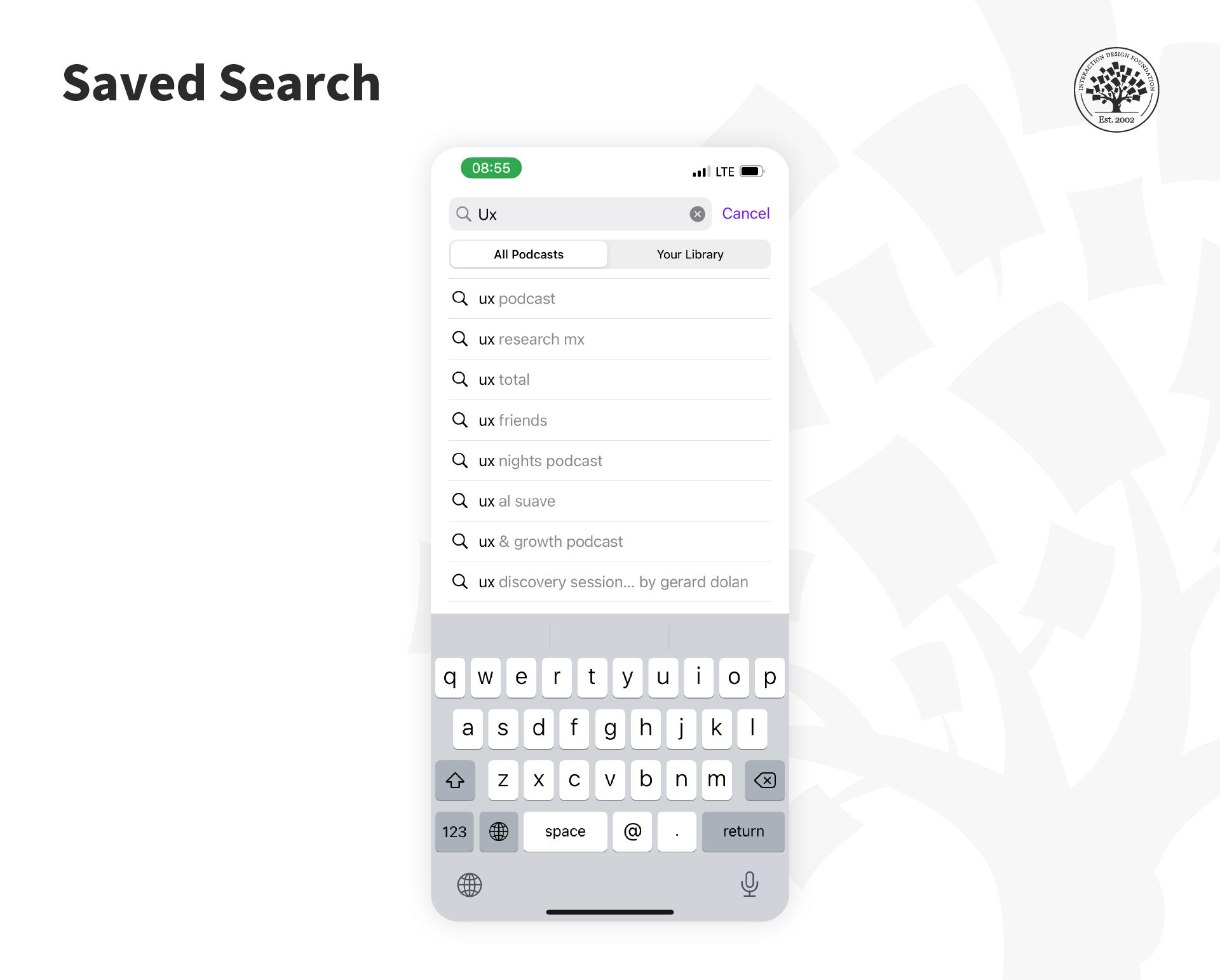
Saved search allows users to save their frequently searched queries so they can easily access them in the future without the need to retype them every time.

© Apple Podcasts, Fair Use

A saved search will generally require user action to retain the search for later use; a recent search will usually be stored automatically by the app with no action required by the user.

Search Forms

Suppose you need a variety of data to conduct a search, for example, a flight-booking service. You should know the date of departure, return date, number of people flying and seat preferences or destinations. Then you can use a simple form to collect all the data to deliver quality search results.
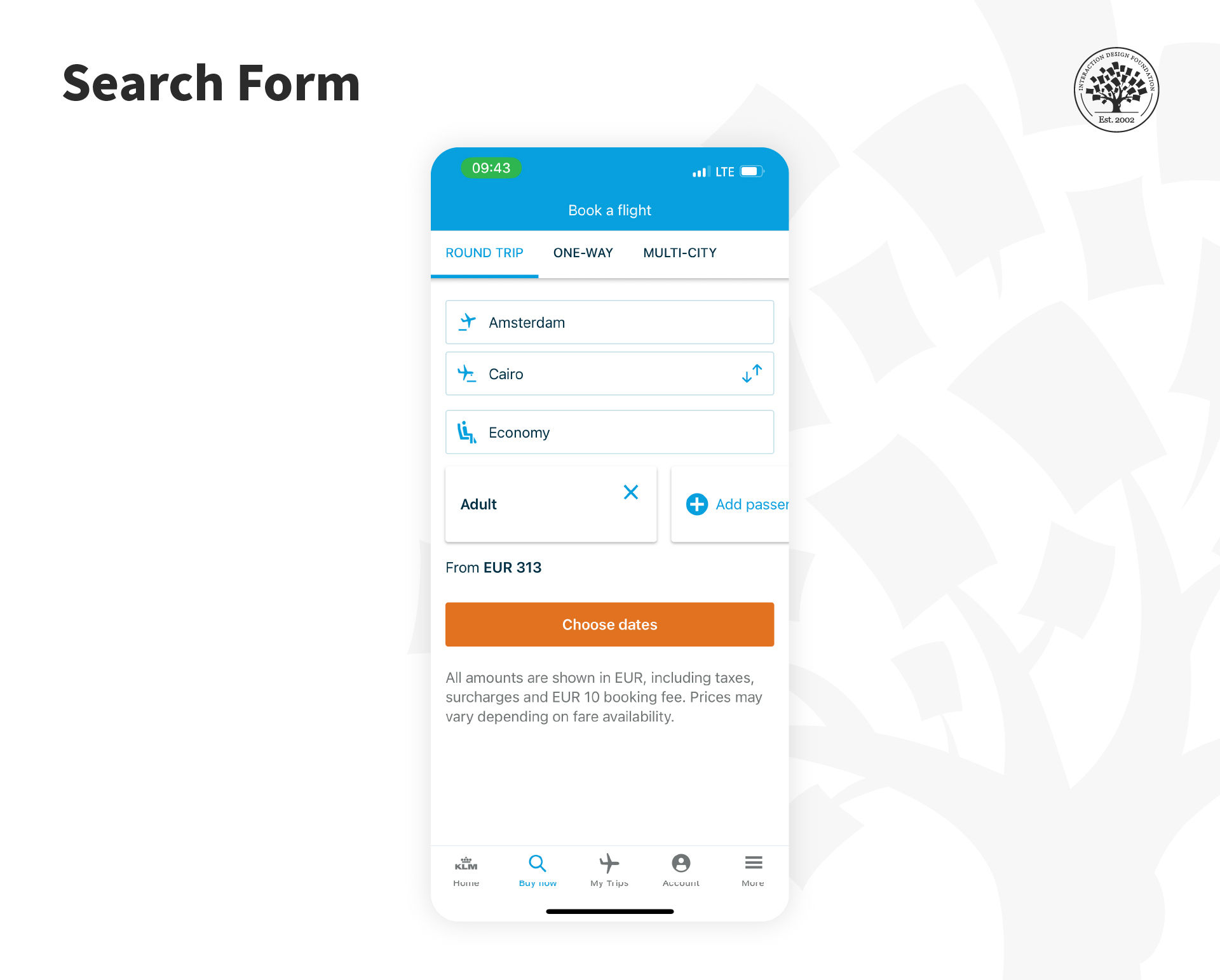
Travel-related services such as airline websites and apps ask travelers to add all information in a form and then serve the results based on those inputs.

© KLM, Fair Use

The idea is to keep this as simple as possible to maintain the quality of results. Only use the necessary and don’t waste screen real estate or inconvenience the mobile user with a limited amount of patience to type. To focus on operating system input techniques when you design mobile forms can also be valuable.

You should, as always, follow form design best practices to ensure that forms deliver maximum usability and utility.

Search Results

You can share search results with the user in many ways: 

  • Thumbnail images of relevant results—for products, pictures, and more.

  • Tabulated results—ideal for flights, hotels, etc.

  • List results—a standard search result for data-based pages and the like.

  • Map results—where location matters.

Additionally, you can offer the user the ability to switch between result formats. The ideal practice is to find a default display that most users prefer and then to offer transitions to less popular choices.

You can provide a small handful of results and allow the user to extend the results list if they cannot find what they want in the initial results. This will help the user save data costs and take up less mobile bandwidth.

It is also valuable to indicate the total number of results found so that the user can decide whether to scroll through the list or, if it is dauntingly large, to refine their search before they explore the list.

The Take Away

People rely extensively on search functions to navigate the online space. Hence, it is crucial to implement search effectively within your mobile site or application. You can choose from any of the eight search patterns (auto-complete, explicit, dynamic, scoped, faceted, saved and recent, search forms and search results) individually or in combination with each other to support user tasks and deliver a better experience.

References and Where to Learn More

Find some great designs for mobile search UIs here at Design Your Way. 

Get some guidance from experts on designing successful mobile applications using UI patterns

Learn how to apply the Faceted Search pattern from the Nielsen Norman Group.

Hero image: © Envato Elements, Commercial license, Interaction Design Foundation, CC BY-SA 4.0


Learn More in This Course:

Mobile UX Design: The Beginner's Guide

3 days
74 % booked
View Course

What You Should Read Next

  • Read full article
    What is Interaction Design? - Article hero image
    Interaction Design Foundation logo

    What is Interaction Design?

    Interaction design is an important component within the giant umbrella of user experience (UX) design. In this article, we’ll explain what interaction design is, some useful models of interaction design, as well as briefly describe what an interaction designer usually does.A simple and useful unders

    Social shares
    1.5k
    Published
    Read Article
  • Read full article
    Apple’s Product Development Process – Inside the World’s Greatest Design Organization - Article hero image
    Interaction Design Foundation logo

    Apple’s Product Development Process – Inside the World’s Greatest Design Organization

    Apple’s Product Development Process may be one of the most successful design processes ever implemented. With a valuation that exceeds $2 trillion, there’s a lot that designers can learn from Apple and introduce into their own design environments.Apple is a notoriously secretive business. In Steve J

    Social shares
    1.4k
    Published
    Read Article
  • Read full article
    10 Great Sites for UI Design Patterns - Article hero image
    Interaction Design Foundation logo

    10 Great Sites for UI Design Patterns

    You don’t want to spend your whole life redesigning the wheel, do you? No, neither do we. If you are looking for a design that solves a problem that has been solved with a different application before, then the template for your wheel is probably already out there. This lets you save time and make a

    Social shares
    1.4k
    Published
    Read Article
  • Read full article
    Shneiderman’s Eight Golden Rules Will Help You Design Better Interfaces - Article hero image
    Interaction Design Foundation logo

    Shneiderman’s Eight Golden Rules Will Help You Design Better Interfaces

    Follow Ben Shneiderman’s 'Eight Golden Rules of Interface Design' if you want to design great, productive and frustration-free user interfaces. Apple, Google and Microsoft are among some of the highly successful companies whose well-designed products reflect Shneiderman’s rules. The characteristics

    Social shares
    1.4k
    Published
    Read Article
  • Read full article
    User Interface Design Guidelines: 10 Rules of Thumb - Article hero image
    Interaction Design Foundation logo

    User Interface Design Guidelines: 10 Rules of Thumb

    Learn to design with your user’s needs and expectations in mind by applying Jakob Nielsen and Rolf Molich’s Ten User Interface Guidelines. These heuristics have been reflected in many of the products designed by some of the most successful companies in the world such as Apple, Google, and Adobe. Fur

    Social shares
    1.4k
    Published
    Read Article
  • Read full article
    How to Change Your Career from Graphic Design to UX Design - Article hero image
    Interaction Design Foundation logo

    How to Change Your Career from Graphic Design to UX Design

    If there’s an occupation that is 100% linked with the public’s idea of what design is all about, it’s graphic design. From the familiar golden arches of the McDonald’s brand to the typography and colors of movie posters, graphic designers create some of the most iconic and ubiquitous designs around

    Social shares
    1.4k
    Published
    Read Article
  • Read full article
    Repetition, Pattern, and Rhythm - Article hero image
    Interaction Design Foundation logo

    Repetition, Pattern, and Rhythm

    Let’s look at three subjects that, at first glance, may strike you as being incredibly basic and self-explanatory. However, although they may seem like they should need no introduction, we should study them. By understanding these concepts, you’ll be able to apply them more effectively to captivate

    Social shares
    1.4k
    Published
    Read Article
  • Read full article
    The Grid System: Building a Solid Design Layout - Article hero image
    Interaction Design Foundation logo

    The Grid System: Building a Solid Design Layout

    Now that we’ve seen some grids at work in the Rule of Thirds article, let’s examine them a little more deeply. As a concept that deals so fundamentally with the fabric and background of our work as designers, it’s easy to overlook the power of grids and think more about the elements we want to creat

    Social shares
    1.4k
    Published
    Read Article
  • Read full article
    The Principles of Service Design Thinking - Building Better Services - Article hero image
    Interaction Design Foundation logo

    The Principles of Service Design Thinking - Building Better Services

    Service design is all about taking a service and making it meet the user’s and customer’s needs for that service. It can be used to improve an existing service or to create a new service from scratch. In order to adapt to service design, a UX designer will need to understand the basic principles of

    Social shares
    1.4k
    Published
    Read Article
  • Read full article
    The Golden Ratio - Principles of form and layout - Article hero image
    Interaction Design Foundation logo

    The Golden Ratio - Principles of form and layout

    Now, we’re going to look at a subject that comes directly from mathematics and that we can also find all around us – the golden ratio. Don’t worry; we’re not going back into the classroom for long. We will examine what this concept is and exactly how much it is a fundamental part of making designs p

    Social shares
    1.3k
    Published
    Read Article

Top Articles

Top Topic Definitions

Feel Stuck?
Want Better Job Options?

AI is replacing jobs everywhere, yet design jobs are booming with a projected 45% job growth. With design skills, you can create products and services people love. More love means more impact and greater salary potential.

At IxDF, we help you from your first course to your next job, all in one place.

See How Design Skills Turn Into Job Options
Privacy Settings
By using this site, you accept our Cookie Policy and Terms of Use.
Customize
Accept all

Be the One Who Inspires

People remember who shares great ideas.

Share on:

Academic Credibility — On Autopilot

Don't waste time googling citation formats. Just copy, paste and look legit in seconds.

Feel Stuck? Want Freedom?

Get one powerful email each week, like 326,112 others.

Learn to design a life you love.

Next email in
6
days
16
hrs
42
mins
4
secs