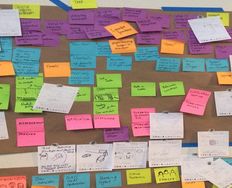
Four different color sticky notes. From left to right: a yellow note, a blue note that summarizes the group the yellow note is a part of, a pink note that summarizes the blue notes, and a green note that summarizes the pink notes.

How to Get Started with Affinity Diagrams

• 15 min read

473 Shares

Affinity diagramming is almost too good to be true. Write on some sticky notes, arrange them, and…that’s it. But don’t let its simplicity fool you. With affinity diagrams in your toolbox, you’ll have the power to bridge the gap between research and results.

Begin with Affinity Notes

Affinity diagrams start as a collection of user observations in the form of affinity notes. They are typically written on adhesive notes or their digital equivalents, though you may also use printed cards or other formats. In this video, William Hudson, User Experience Strategist and Founder of Syntagm Ltd, introduces affinity notes and the methods you can use to obtain them.

Transcript

"Affinity notes" are the basic observations of what participants said or did that you write in the first person. The “voice of the customer” is the preferred term, though “the voice of the user” is equally relevant.

How to Build an Affinity Diagram Step by Step

Now that you understand how user research translates into affinity notes and how to write them, William provides a detailed explanation of the diagramming process:

Transcript

In the affinity diagramming process:

  • Begin with the affinity notes and organize them into related groups.

  • Then label the groups and repeat the process at two or more levels, depending on the number of observations. This process creates a hierarchical structure.

  • All levels, except the top, maintain the voice of the customer. The top level can use more abstract topic descriptions, such as "Online Shopping."

In affinity diagramming, participants traditionally arrange notes on a table or a vertical surface, such as a wall or a whiteboard, in a room large enough to comfortably accommodate all participants. At the end of the session, the group may take a photo of the diagram to capture the results.

However, digital tools now make it easier to create affinity diagrams online. The concept remains the same—you write your notes on virtual sticky notes and arrange them collaboratively via video calls or other online tools. While you lose the benefits of in-person collaboration, online sessions make it easier to revisit and amend your diagram. And if your team is scattered geographically, online sessions help overcome travel and time zone challenges.

Affinity Diagram Guide

This practical guide will help you stay on track during your affinity diagramming sessions. It summarizes the colors used in the hierarchies, provides useful metrics on the number of notes at each level, and includes step-by-step instructions for running your session.

Advance Your Career With This Free Template for “Get Started with Affinity Diagrams: A Step-by-Step Guide”
Get Started with Affinity Diagrams: A Step-by-Step Guide
We respect your privacy
Get 1 powerful email each week: Design a life you love!

The Take Away

Affinity diagrams are highly effective for turning raw research into actionable insights, and the steps involved are simple:

  • You begin with affinity notes—original user observations in the first person, known as the "voice of the customer," which you typically transcribe on-site or from audio recordings of remote sessions.

  • Next, review the transcribed data with the original interviewees to ensure you have not changed the meaning.

  • To begin the diagramming process, group the yellow affinity notes according to their connections and place a blue note on top.

  • Next, arrange the blue notes into groups with a pink note on top, then arrange the pink notes with a green note on top. Write all notes in the voice of the customer, except the green notes, which use more abstract categories.

When you follow this process, your aim is to accurately represent user observations and group related themes using a hierarchical approach. Affinity diagramming is an engaging activity that immerses participants in user research. The effectiveness of the results lies in the decisions you make as a group.

References and Where to Learn More

Discover more about affinity diagramming and other key contextual design techniques in Karen Holtzblatt’s and Hugh Beyer’s seminal book, Contextual Design: Design for Life.

Read Nielsen Norman Group’s article to find out How Many Users You Should Visit for Contextual Inquiry.

Hero image: © Interaction Design Foundation, CC BY-SA 4.0

Learn More in This Course:

Personas and User Research: Design Products and Services People Need and Want

Course Closed
100 % booked
View Course

What You Should Read Next

  • Read full article
    Stage 2 in the Design Thinking Process: Define the Problem and Interpret the Results - Article hero image
    Interaction Design Foundation logo

    Stage 2 in the Design Thinking Process: Define the Problem and Interpret the Results

    An integral part of the Design Thinking process is the definition of a meaningful and actionable problem statement, which the design thinker will focus on solving. This is perhaps the most challenging part of the Design Thinking process, as the definition of a problem (also called a design challenge

    Social shares
    1.4k
    Published
    Read Article
  • Read full article
    A Simple Introduction to Lean UX - Article hero image
    Interaction Design Foundation logo

    A Simple Introduction to Lean UX

    Lean UX is an incredibly useful technique when working on projects where the Agile development method is used. Traditional UX techniques often don’t work when development is conducted in rapid bursts – there’s not enough time to deliver UX in the same way. Fundamentally Lean UX and other forms of UX

    Social shares
    1.3k
    Published
    Read Article
  • Read full article
    How to Do a Thematic Analysis of User Interviews - Article hero image
    Interaction Design Foundation logo

    How to Do a Thematic Analysis of User Interviews

    You have been in the field talking to users and you now find yourself with a massive amount of audio, notes, video, pictures, and interesting impressions. All that information can be overwhelming, and it’s difficult to know where to start to make sense of all the data. Here, we will teach you how to

    Social shares
    1.3k
    Published
    Read Article
  • Read full article
    How to Conduct User Interviews - Article hero image
    Interaction Design Foundation logo

    How to Conduct User Interviews

    You may have noticed in life that few (if any!) people think like you do. So there’s absolutely no reason for you to think your users think like you either! You need to go out and meet your users if you want to properly understand and design for them, and user interviews are a great way to achieve t

    Social shares
    1.3k
    Published
    Read Article
  • Read full article
    Data Analysis: Techniques, Tools, and Processes - Article hero image
    Interaction Design Foundation logo

    Data Analysis: Techniques, Tools, and Processes

    Data analysis is one of those terms that “is what it sounds like,” although there’s more to it than may meet the eye. In any case, it’s a valuable skill for making better decisions—a skill that you can bring to bear on both your professional and personal life, from personal budgeting to analyzing cu

    Social shares
    1.2k
    Published
    Read Article
  • Read full article
    7 Great, Tried and Tested UX Research Techniques - Article hero image
    Interaction Design Foundation logo

    7 Great, Tried and Tested UX Research Techniques

    Thinking about conducting some user research? Wondering which techniques are most likely to provide useful results? Then look no further. We’ve compiled a list of 7 excellent techniques which are tried and tested and have been proven to deliver real value in UX projects. Let’s take a look at each te

    Social shares
    1.2k
    Published
    Read Article
  • Read full article
    UX Roles: The Ultimate Guide – Who Does What and Which One You Should Go For? - Article hero image
    Interaction Design Foundation logo

    UX Roles: The Ultimate Guide – Who Does What and Which One You Should Go For?

    Do you have the ambition and enthusiasm for a career in UX design but don’t know where to start? You’ll be pleased to know there are many paths you can take. Even as a relatively new field, user experience (UX) design has both general and specialist job roles. This variety means there is a role wait

    Social shares
    1.2k
    Published
    Read Article
  • Read full article
    User Research: What It Is and Why You Should Do It - Article hero image
    Interaction Design Foundation logo

    User Research: What It Is and Why You Should Do It

    User research is an essential part of UX design. Unless we understand who we are designing for and why, how can we even know what to create or where to begin? Depending on your project, requirements and constraints, you can choose different types of research methods, from surveys and tests to interv

    Social shares
    1.1k
    Published
    Read Article
  • Read full article
    How to Conduct User Observations - Article hero image
    Interaction Design Foundation logo

    How to Conduct User Observations

    Observing users interacting with a product can be a great way to understand the usability of a product and to some extent the overall user experience. Conducting observations is relatively easy as it doesn’t require a huge amount of training and it can be relatively fast – depending on the sample si

    Social shares
    1.1k
    Published
    Read Article
  • Read full article
    Top UX and UI Design Tools for 2026: A Comprehensive Guide - Article hero image
    Interaction Design Foundation logo

    Top UX and UI Design Tools for 2026: A Comprehensive Guide

    UI/UX design tools, also called user interface and user experience design tools, are specialized software applications that help designers create, modify, and explore user interfaces and user experiences. But they’re more than just software: They’re like bridges in a sense, or a way for you, dear de

    Social shares
    1.1k
    Published
    Read Article

Top Articles

Top Topic Definitions

Feel Stuck?
Want Better Job Options?

AI is replacing jobs everywhere, yet design jobs are booming with a projected 45% job growth. With design skills, you can create products and services people love. More love means more impact and greater salary potential.

At IxDF, we help you from your first course to your next job, all in one place.

See How Design Skills Turn Into Job Options
Privacy Settings
By using this site, you accept our Cookie Policy and Terms of Use.
Customize
Accept all

Be the One Who Inspires

People remember who shares great ideas.

Share on:

Academic Credibility — On Autopilot

Don't waste time googling citation formats. Just copy, paste and look legit in seconds.

Feel Stuck? Want Freedom?

Get one powerful email each week, like 326,226 others.

Learn to design a life you love.

Next email in
6
days
20
hrs
10
mins
34
secs